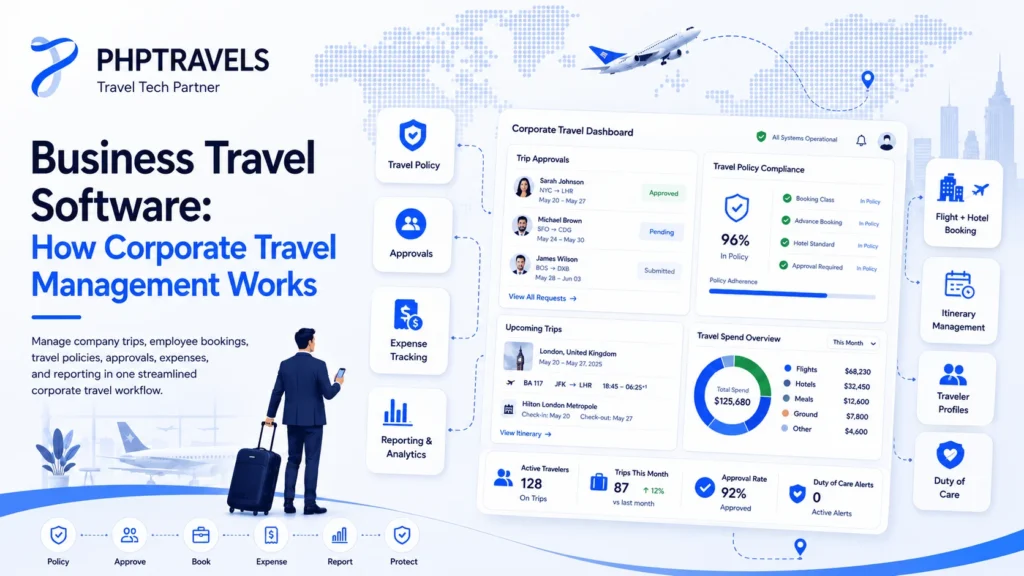
Managing business trips becomes difficult when booking, approvals, invoices and travel policies are handled through separate emails, spreadsheets and supplier portals.
An employee may request a trip by email, a manager may approve it through a message, the travel desk may book through another system, and the finance team may receive the invoice several days later. This creates delays and makes it difficult to see the complete cost of a trip.
Business travel software connects these activities in one controlled workflow. It can help companies and travel management businesses organize trip requests, apply travel policies, access supplier inventory, manage approvals and keep booking and financial records connected.
However, not every platform offers the same features. Some systems focus only on booking, while others include corporate approvals, traveler profiles, invoicing, reporting and post-booking operations.
This guide explains how a complete business travel system works, which features matter and what companies should check before selecting a platform.
Quick Summary
Business travel software helps companies manage employee and corporate travel through one connected system.
A complete platform may include:
- Trip requests and approval workflows
- Company travel policies
- Flight, hotel and transfer bookings
- Supplier and GDS integrations
- Traveler profiles and department roles
- Invoices, payments and expense visibility
- Booking reports and audit history
- Post-booking changes and customer support
The most important consideration is not the number of features shown on a sales page. It is whether the system supports the company’s actual workflow from the initial trip request to the final invoice and report.
What Is Business Travel Software?
Business travel software is a system used to organize and control travel arranged for employees, executives, corporate clients or business groups.
Unlike a public consumer-booking website, corporate travel software normally includes additional controls such as:
- Who is allowed to book
- Which suppliers or fares can be selected
- How much an employee can spend
- Which manager must approve a request
- How invoices are assigned to departments
- Where traveler and booking records are stored
- How finance teams review travel costs
A company may operate its own system, or a travel management company may provide the system to corporate clients.
Businesses that require a complete booking and operations environment can explore a connected business travel software platform that brings corporate workflows and travel inventory into one system.
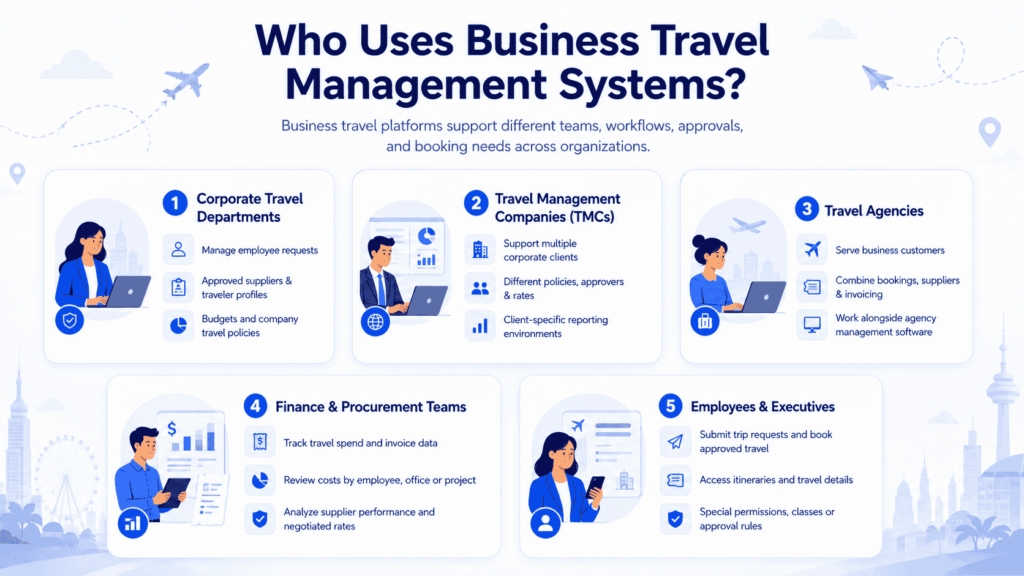
Who Uses Business Travel Management Systems?
Business travel platforms may be used by several types of organizations.
Corporate Travel Departments
An internal travel department can use the platform to manage employee requests, approved suppliers, traveler profiles, department budgets and company policies.
Travel Management Companies
A travel management company, or TMC, can create separate accounts and booking environments for multiple corporate clients. Each client may have different policies, approvers, negotiated rates and reporting requirements.
Travel Agencies
An agency serving business customers can combine corporate booking services with its existing supplier inventory, agent operations and invoicing process.
Agencies handling bookings, quotations, suppliers and customer records may also require broader travel agency management software alongside corporate travel controls.
Finance and Procurement Teams
Finance teams use booking and invoice data to monitor travel spend, verify payments and review costs by employee, office, project or department.
Procurement teams may use supplier and booking reports to review contracted rates and negotiate better commercial terms.
Employees and Executives
Employees use the front-end portal to submit trip requests, search approved travel options, complete bookings and access their itineraries.
Executives may have different approval rules, travel classes or booking permissions based on company policy.
How Business Travel Software Works
A complete corporate travel process normally moves through several connected stages.
1. An Employee or Agent Creates a Trip Request
The process starts when a traveler or travel agent enters information such as:
- Destination
- Travel dates
- Purpose of travel
- Estimated budget
- Preferred flight or hotel
- Department or project
- Required services
For a simple domestic trip, the request may follow a short workflow. An international or high-value trip may require additional approvals.
A structured request prevents important details from being lost in emails or messages.
2. The System Checks the Company Travel Policy
Before the trip proceeds, the system can compare the request with predefined company rules.
Policy rules may include:
- Maximum hotel rate
- Permitted cabin class
- Preferred airlines or hotels
- Advance-booking requirements
- Maximum trip budget
- Restricted destinations
- Department-level limits
- Approval requirements for international travel
The system may approve a compliant request automatically, flag it for review or prevent the user from continuing until approval is received.
The exact behavior depends on how the company configures its corporate travel workflows.
3. The Request Is Sent to the Correct Approver
Approval routing should follow the company’s actual management structure.
For example:
- A local trip may go to the employee’s direct manager.
- An international trip may require department and finance approval.
- A trip above a set amount may require senior-management approval.
- A project-related trip may be sent to the relevant cost-centre owner.
A useful system should record who submitted, approved, rejected or modified each request. This creates a clearer audit history than approvals scattered across email and chat.
4. The Traveler Searches and Books Approved Inventory
Once authorization is available, the traveler or travel desk can search flights, hotels and other services.
A connected travel booking software platform may receive inventory from:
- Global distribution systems
- Airline APIs
- Hotel suppliers
- Direct contracts
- Transfer providers
- Tour and activity suppliers
- Internal inventory
The system can then apply company rules, negotiated rates, service fees or relevant pricing logic before displaying the results.
How Flight APIs Handle Changing Prices and Availability
Flight prices and seat availability can change frequently. A booking platform normally sends a request to the connected supplier or GDS when the user performs a search.
The supplier returns available flights, schedules, fare conditions and prices based on that search.
When the customer continues toward booking, the system may revalidate the fare and availability. If the supplier’s price has changed, the latest valid price should be shown before confirmation.
This means:
- Search results can update automatically when new dates are selected.
- Prices can change between the initial search and final booking.
- A fare is not necessarily guaranteed until it has been confirmed by the supplier.
- Cancellation and change conditions depend on the selected fare.
- Schedule-change notifications depend on the supplier API and post-booking setup.
Companies requiring air-search and ticketing workflows should evaluate the capabilities of their flight booking software, not only the design of the search page.
Depending on the business model and supplier agreement, a platform may connect with solutions such as Amadeus travel agent software or Sabre software for travel agents.
5. Booking, Traveler and Payment Records Are Connected
After confirmation, the system should keep the booking connected to the relevant:
- Traveler
- Corporate client
- Department
- Cost centre
- Approver
- Supplier
- Invoice
- Payment
- Voucher or itinerary
This connection is important because a company should be able to trace the complete history of a trip without searching through several systems.
For example, the finance team should be able to identify which department requested the trip, who approved it, which supplier confirmed it and how it was paid.
6. Post-Booking Changes Are Managed
Corporate travel does not end when a reservation is created.
A traveler may need to:
- Change a flight
- Cancel a hotel
- Correct traveler details
- Request a refund
- Reissue a ticket
- Add a transfer
- Receive an updated itinerary
A strong business travel platform should provide the travel desk or support team with booking history, supplier references, payment status and previous actions.
Some updates can be received through supplier APIs or notifications. Others may still require manual action by the travel team. The available automation depends on the connected supplier and the functionality included in the integration.
7. Invoices, Expenses and Reports Are Reviewed
The final stage connects booking activity with financial reporting.
The platform may help finance teams:
- Generate or store invoices
- Match payments with bookings
- Review supplier costs
- Track refunds and amendments
- Group spending by department
- Export data for accounting
- Compare budgeted and actual travel costs
- Identify policy exceptions
Companies that need a deeper comparison of finance-related features can review this guide to travel expense management software.
It is important to distinguish between booking-cost visibility and complete employee expense management. Meals, mileage, incidental expenses and receipt reimbursement may require a dedicated expense module or third-party integration.
Core Features to Check
Centralized Booking
Users should be able to search the travel services permitted by the organization without moving between disconnected supplier portals.
A centralized system also makes it easier to apply consistent pricing, booking and approval rules.
Policy Management
The company should be able to define rules by:
- Employee role
- Department
- Office
- Destination
- Service type
- Trip value
- Travel class
- Corporate client
Flexible policy configuration is more useful than one rule applied to every traveler.
Multi-Level Approvals
Approval workflows should support the company’s real reporting structure.
Check whether the system allows:
- Multiple approvers
- Approval based on booking value
- Different rules by department
- Escalation when an approver is unavailable
- Approval history
- Reapproval after a price change
Traveler Profiles
Traveler profiles can store information required for booking, including contact details and travel preferences.
Sensitive data should only be available to authorized users. Role-based permissions and controlled access are especially important when several agents or corporate clients use the same platform.
Supplier and API Integrations
The platform should explain clearly:
- Which suppliers are supported
- Whether the integration is search-only or bookable
- Whether fare revalidation is available
- Whether cancellations and amendments are supported
- How booking confirmations are received
- Whether a sandbox is available
- Who is responsible for the supplier contract
- Whether extra integration fees apply
A long integrations list is not useful unless the required supplier supports the complete workflow needed by the business.
Payments, Invoices and Reconciliation
The system should keep payment and invoice activity connected to the booking.
Depending on the company’s setup, payments may include:
- Online payment gateways
- Corporate cards
- Agency credit
- Bank transfers
- Prepaid balances
- Client credit limits
- Offline payments
The finance team should be able to identify paid, pending, refunded and partially paid bookings without maintaining a separate spreadsheet.
Reporting and Analytics
Useful reporting can include:
- Travel spend by department
- Bookings by supplier
- Average flight or hotel cost
- Policy-compliant and non-compliant bookings
- Cancellations and refunds
- Unused bookings or tickets
- Approval time
- Booking lead time
- Agent or corporate-client performance
Reports should support decisions rather than only display total booking numbers.
Consumer Booking Website vs Business Travel Software
| Area | Consumer Booking Website | Business Travel Software |
|---|---|---|
| Primary user | Individual traveler | Employee, company or TMC |
| Policy rules | Normally unavailable | Company-specific controls |
| Approvals | Not usually required | One or multiple approval levels |
| Traveler records | Personal account | Managed corporate profiles |
| Pricing | Public rates | Public, contracted or negotiated rates |
| Reporting | Individual booking history | Department and company reporting |
| Invoicing | Customer receipt | Corporate billing and reconciliation |
| Permissions | Standard user access | Employee, manager, agent and admin roles |
| Supplier setup | Controlled by website | May include company or agency suppliers |
| Audit history | Limited | Request, approval and booking history |
Business Travel Software for Small Companies
A small company may not need an enterprise-level implementation.
A practical small-business setup may begin with:
- One booking portal
- A basic travel policy
- One manager approval
- Central traveler records
- Simple invoice reporting
- A limited number of supplier connections
The objective should be to replace scattered processes, not introduce unnecessary complexity.
Small companies should also check whether the software requires technical hosting, custom integration work or dedicated administration.
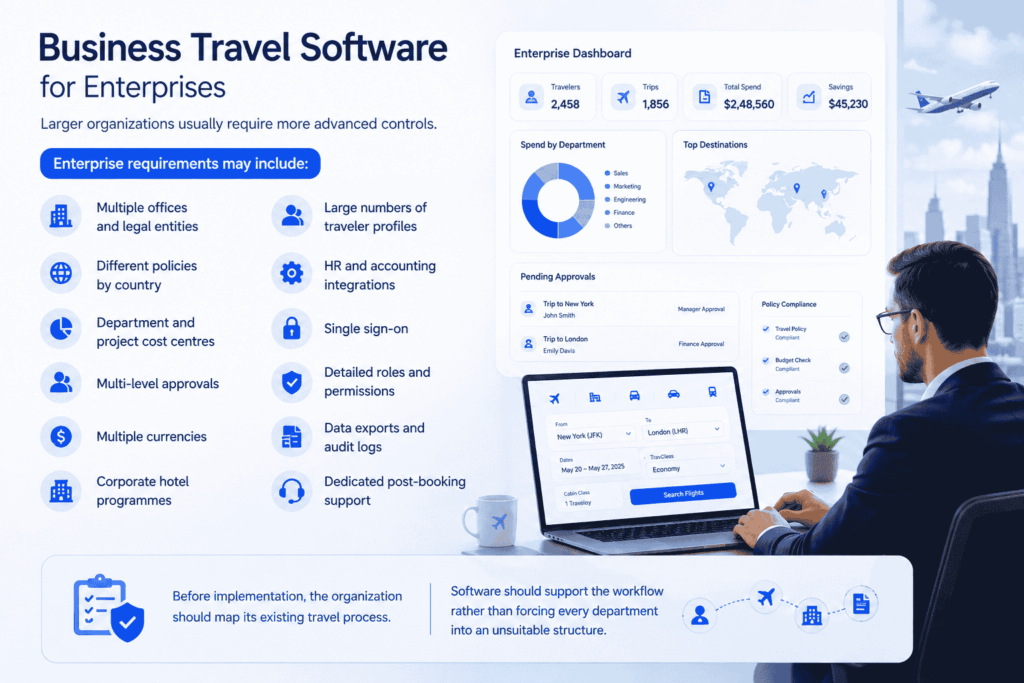
Business Travel Software for Enterprises
Larger organizations usually require more advanced controls.
Enterprise requirements may include:
- Multiple offices and legal entities
- Different policies by country
- Department and project cost centres
- Multi-level approvals
- Multiple currencies
- Corporate hotel programmes
- Large numbers of traveler profiles
- HR and accounting integrations
- Single sign-on
- Detailed roles and permissions
- Data exports and audit logs
- Dedicated post-booking support
Before implementation, the organization should map its existing travel process. Software should support the workflow rather than forcing every department into an unsuitable structure.
Common Implementation Mistakes
Starting Without Mapping the Workflow
Companies sometimes purchase software before documenting who requests, approves, books and pays for travel.
This creates confusion during configuration.
Choosing Based Only on the Interface
A visually attractive booking page does not guarantee that approvals, invoicing, refunds and supplier operations will work correctly.
Assuming Every API Offers the Same Functions
Some APIs provide only search results. Others support booking, cancellation or post-booking services.
Each supplier should be evaluated individually.
Overloading the First Version
Trying to launch every supplier, module and department at once can make implementation slower.
It is often better to begin with the most important workflows and add complexity after the core process is stable.
Ignoring Post-Booking Support
Changes, refunds and schedule updates are an important part of corporate travel. A platform should be evaluated beyond the initial checkout.
Creating Too Many Disconnected Reports
Reports are useful only when booking, supplier, client and payment information use consistent records.
A Practical Implementation Process
Step 1: Document the Existing Process
Map how trips are currently requested, approved, booked, paid and reported.
Identify delays, duplicate work and missing information.
Step 2: Define Roles and Policies
List employees, managers, travel agents, finance users and administrators.
Create clear approval and spending rules for each group.
Step 3: Select the Required Suppliers
Choose suppliers based on the markets and travel services the company actually sells or books.
Confirm commercial agreements before integration work begins.
Step 4: Configure and Test the Complete Workflow
Test more than a successful booking.
Also test:
- Price changes
- Rejected requests
- Cancelled reservations
- Failed payments
- Refunds
- Different user roles
- Supplier errors
- Updated itineraries
Step 5: Launch in Phases
Begin with a department, office or corporate client.
Review feedback and reports before rolling the platform out to the full organization.
Where PHPTRAVELS Fits
PHPTRAVELS is designed for travel businesses and corporate travel operations that require booking workflows, supplier connectivity and administrative control.
Depending on the selected setup and customization requirements, the platform can support areas such as:
- Branded booking portals
- Corporate and agent accounts
- Approval and policy workflows
- Traveler records
- Supplier and GDS integrations
- Payments and invoicing
- CRM connectivity
- Expense visibility
- Booking and operational reporting
The exact modules, suppliers and post-booking functions should be confirmed for the selected package and integration before implementation.
Organizations should evaluate PHPTRAVELS based on their actual products, supplier contracts, approval structure and financial workflow not only on the total number of available features.
The Future of Corporate Travel Technology
Corporate travel platforms are continuing to move toward better automation, mobile access, predictive reporting and more connected financial workflows.
Future improvements are likely to focus on:
- Faster policy-based recommendations
- More automated approval routing
- Better disruption notifications
- Improved traveler self-service
- More detailed cost forecasting
- Sustainability and emissions reporting
- AI-assisted customer and traveler support
These trends should support human travel teams rather than remove necessary operational review. Complex refunds, supplier disputes and emergency changes may still require experienced support staff.
For a dedicated discussion of these developments, read the guide to business travel trends in 2026.
Conclusion
Business travel software is not simply a website for reserving flights and hotels. It is an operational system that connects people, policies, suppliers, bookings and financial records.
A successful platform should make it easier for travelers to book approved services while giving travel managers and finance teams the control they need.
Before choosing a system, companies should document their current process, confirm supplier capabilities, test post-booking operations and ensure that reporting reflects the real structure of the business.