Custom flight search design is more than creating a form connected to an airline API. It is the part of a travel platform where live inventory, changing prices, traveler preferences and booking rules must be presented in a way users can understand.
A visually attractive interface can still fail when it shows expired fares, hides baggage conditions, loses selected filters or forces users to repeat searches. A successful flight search must help users find, compare, shortlist and book an itinerary with as little uncertainty as possible.
This guide explains how travel agencies, online travel agencies, metasearch businesses and travel-platform teams can apply custom flight search design principles that support real bookings rather than demonstration data.
Quick Summary
A high-performing custom flight search should:
- Ask only for information required to start the search.
- Support cities, airports, nearby airports and IATA codes.
- Help flexible travelers compare nearby travel dates.
- Display total prices, stops, baggage and fare conditions clearly.
- Allow users to filter, sort, save and compare suitable itineraries.
- Revalidate the selected fare before payment.
- Preserve the user’s selections throughout the booking workflow.
- Handle unavailable routes, supplier errors and expired offers clearly.
Effective custom flight search design is not about adding the most features. It is about helping users make a confident booking decision while accurately representing supplier data.
What Is a Custom Flight Search?
A custom flight search is a search experience designed around the routes, suppliers, customers and commercial rules of a specific travel business.
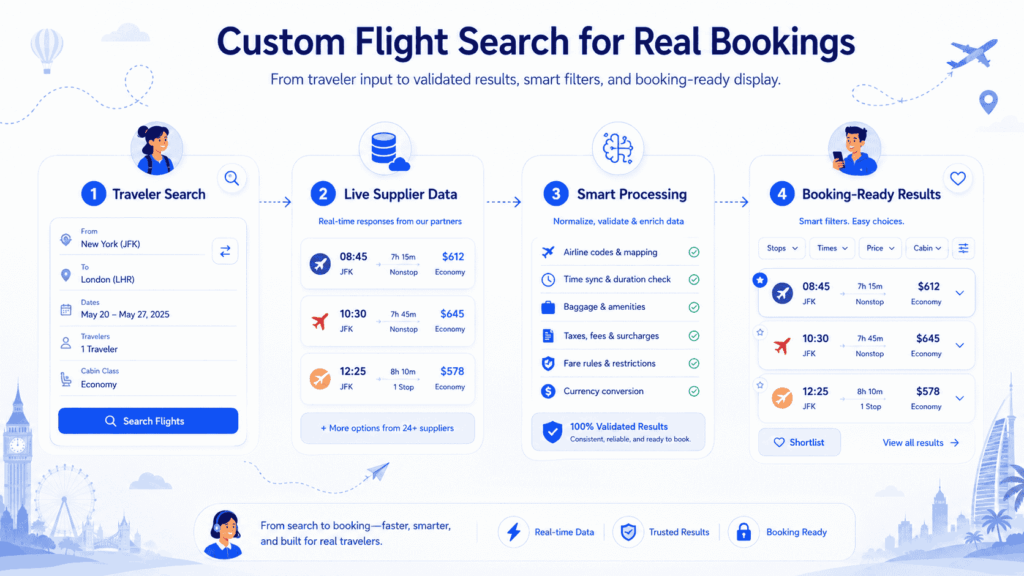
It normally collects the traveler’s route, dates, passenger details and cabin preference before sending a request to one or more airline, GDS, NDC, low-cost carrier or consolidator sources. It then standardizes the returned offers and presents them through one consistent interface.
Unlike a basic search widget, a custom flight search may also include:
- Agency-specific markups and commissions
- Preferred airline positioning
- Nearby airport logic
- Flexible-date results
- Corporate travel policies
- Customer-specific pricing
- Multiple currencies and languages
- B2B agent permissions
- Saved searches and shortlisted flights
- Fare revalidation and booking controls
The interface therefore cannot be designed separately from the underlying flight booking software. Search, pricing, passenger entry, payment, ticketing and post-booking operations must use compatible data and maintain the same itinerary, passenger and supplier references throughout the booking workflow.
Why Flight Search Is Difficult to Design
Hotel rooms and fixed products can often be displayed as relatively stable inventory. Airline offers are more time-sensitive.
A flight shown during the initial search may change before the user reaches payment because:
- A booking class has sold out.
- A supplier has returned a new price.
- Taxes or surcharges have changed.
- The fare requires different baggage or change conditions.
- A connecting segment is no longer available.
- The offer has passed its permitted booking time.
- Another supplier has returned a similar itinerary with different rules.
The interface must communicate these conditions without overwhelming the traveler.
For example, showing “Only two seats left” may encourage action, but it should only appear when supported by reliable supplier data. Similarly, a “refundable” label should not be shown unless the platform understands the actual refund conditions and penalties.
Start the Custom Flight Search Design Process With the Complete User Flow
Before designing individual components, map the full journey:
- Select trip type.
- Choose origin and destination.
- Select dates.
- Add passengers and cabin class.
- Submit the search.
- Review and filter results.
- Open fare details.
- Shortlist or select an itinerary.
- Revalidate the selected offer.
- Enter passenger information.
- Add supported extras.
- Complete payment.
- Create the booking and ticket.
- Show confirmation and booking management options.
Every field collected during search should have a clear role later in the booking workflow.
Design Airport Inputs for Travelers, Not Travel Agents
Most users do not think in airport codes. They think in cities, regions or familiar airport names.
A useful origin and destination field should support:
- City names
- Airport names
- IATA codes
- Multiple airports serving one city
- Nearby airports
- Country or region context
- Recent searches
- Clear airport disambiguation
Autocomplete results should show enough context to avoid mistakes, but they should not become a crowded list of codes and technical labels.
The interface should also prevent impossible combinations, such as selecting the same airport as both origin and destination, before sending an API request.
Make Passenger and Cabin Selection Easy to Understand
Passenger selectors often create avoidable errors.
The interface should clearly separate:
- Adults
- Children
- Infants with a seat
- Infants without a seat
It should also explain supplier or airline restrictions when necessary. For example, the permitted number of infants may depend on the number of accompanying adults.
Cabin options should use traveler-friendly terminology:
- Economy
- Premium economy
- Business
- First class
Avoid displaying internal fare-class codes during the initial search. Those codes may be useful in an agent portal, but they usually create confusion in a customer-facing interface.
Use Flexible Dates to Reduce Repeated Searches
Flexible-date search helps users compare nearby travel days without repeatedly editing and resubmitting the same form.
A useful flexible-date experience may include:
- Prices for several days before and after the selected date
- A full-month fare calendar
- A departure-and-return date combination grid
- Identification of lower-priced travel windows
- Nearby airport options
- Price alerts for selected routes
The displayed amount must be clearly labelled. Users should know whether it represents:
- One passenger or all passengers
- One-way or round-trip travel
- The cheapest available fare
- A cached estimate or a live validated price
- A fare with or without baggage
Without these labels, a visually attractive calendar can create misleading price expectations.
How Should Trip.com’s Flexible-Date Grid Be Evaluated?
Trip.com provides flexible-date options such as nearby-date or month-based comparisons, price indicators, filters and price reminders. These features reduce the need to repeat searches when the traveler has flexible plans.
However, a flexible-date grid should not be evaluated only by how many prices it displays.
A proper evaluation should check:
- Whether outbound and return combinations can be compared clearly
- Whether the price represents the complete trip
- Whether baggage and fare conditions remain consistent
- How recently each price was validated
- Whether selecting a date preserves the user’s filters
- Whether the grid works clearly on mobile
- How expired or changed fares are handled
For an OTA, these operational details are as important as the visual grid itself.
Which Flight Search Has the Best Interface and User Experience?
There is no single flight search interface that is best for every traveler or every travel business.
Different platforms provide useful benchmarks for different parts of the experience:
Google Flights is a useful benchmark for rapid exploration, price comparison and tracking. Teams studying similar discovery patterns can also review how Google Flights integration for travel websites differs from operating a complete transactional booking platform.
Skyscanner is useful for broad provider comparison, whole-month exploration, saved flights and price alerts.
Trip.com provides a reference for combining flexible-date discovery with a transactional booking flow.
Google Flights currently presents flight comparison and price-tracking functionality, while Skyscanner supports provider comparison, whole-month searches and price alerts. Skyscanner also allows users to save flights and monitor price changes.
For an agency or OTA, the best interface is not created by copying one of these platforms screen by screen. It is created by selecting suitable interaction patterns and connecting them to the business’s own supplier coverage, pricing rules and booking operations.
Present Flight Results Around Decisions
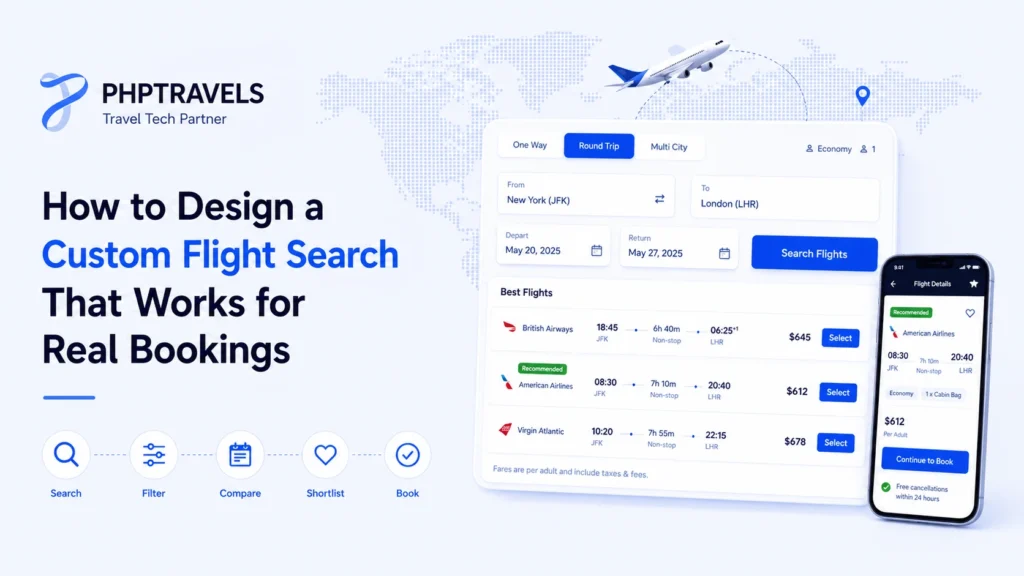
A result card should help the traveler answer the most important questions without opening several additional screens.
At minimum, show:
- Airline and operating carrier
- Departure and arrival times
- Origin and destination airports
- Number of stops
- Connection duration
- Total journey time
- Total price
- Cabin
- Included baggage
- Refund or change summary
- Codeshare information where applicable
Do not give every detail the same visual weight.
Departure time, arrival time, duration, stops and total price usually need stronger prominence. Aircraft type, booking class and detailed fare codes can appear in expandable information.
Use Sorting and Filtering Without Hiding Important Results
Useful sorting options normally include:
- Recommended
- Cheapest
- Fastest
- Earliest departure
- Latest departure
Common flight filters include:
- Direct flights only
- Number of stops
- Airlines
- Departure times
- Arrival times
- Airports
- Journey duration
- Baggage inclusion
- Refundability
- Cabin
- Price range
Applied filters should remain visible and easy to remove. The interface should also show how many results remain after each filter is selected.
On mobile, filters can open in a drawer or full-screen panel, but users should not lose their results or scroll position after applying them.
What Makes a Good Flight Shortlist and Organisation Feature?
There is no universal “best” shortlist feature. A useful shortlist should do more than place a heart icon beside a result.
It should allow users to:
- Save several suitable itineraries
- Compare total prices and journey times
- See fare and baggage differences
- Remove expired offers
- Restore saved options on another device
- Share options with another traveler
- Receive price-change notifications where supported
- Return to the original filtered results
A strong shortlist should also explain that an airline offer is not reserved merely because the user saved it. The price and availability must still be checked before booking.
This is especially important for family, group and business travel, where the person searching may need approval from other travelers before completing payment.
Plan Mobile-First Custom Flight Search Design From the Beginning
Mobile flight search should not be a compressed desktop form.
Important mobile requirements include:
- Large touch targets
- Clear date selection
- Minimal typing
- Sticky access to modify the search
- Visible loading feedback
- Easily removable filter chips
- Preserved search and scroll state
- Compact but readable flight cards
- Clear fare-detail expansion
Multi-city search deserves particular attention. Adding several flight segments on a small screen can quickly become confusing, so each leg should be visually separated and easy to edit.
Accessibility should also be considered. Important fare conditions should not rely only on color, and interactive controls should have understandable labels and keyboard behavior.
Connect Custom Flight Search Design to Reliable Flight APIs
A good interface cannot compensate for incomplete or unreliable supplier data.
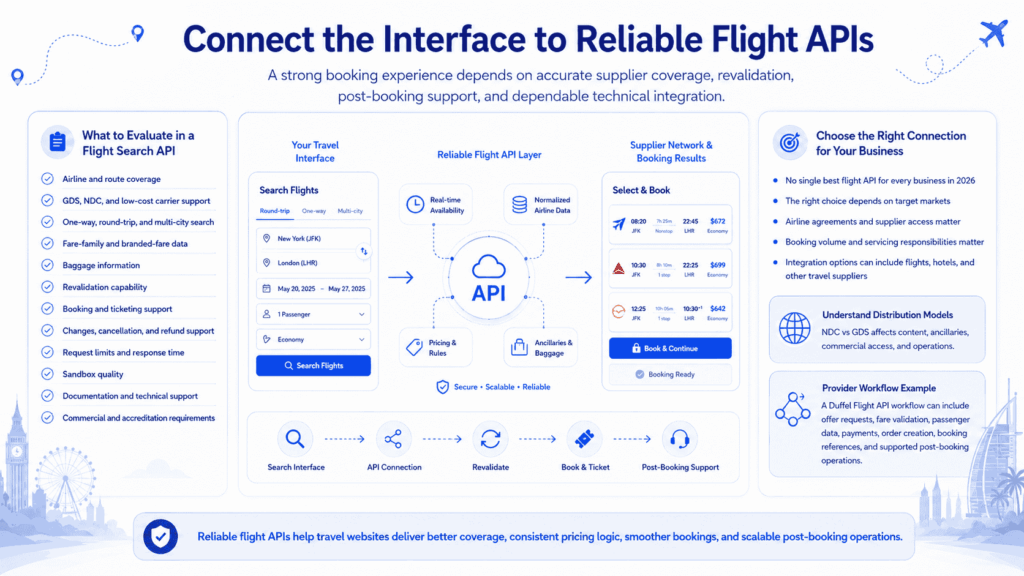
When selecting a flight search API, evaluate:
- Airline and route coverage
- GDS, NDC and low-cost-carrier support
- One-way, round-trip and multi-city search
- Fare-family and branded-fare data
- Baggage information
- Revalidation capability
- Booking and ticketing support
- Changes, cancellation and refund support
- Request limits and expected response time
- Sandbox quality
- Documentation and technical support
- Commercial and accreditation requirements
There is no single best flight search API for every business in 2026. The appropriate connection depends on the business’s target markets, airline agreements, expected booking volume, servicing responsibilities and supplier access. The travel APIs and integration options page provides a broader view of the available flight, hotel and travel-supplier connection models.
Teams should also understand how traditional and modern airline content is distributed before choosing a supplier. The NDC vs GDS airline distribution guide explains how the two models differ in content, commercial access, ancillaries and operational requirements.
Give the Interface the Right Backend Data Structure
The frontend can only display trustworthy information when the backend maintains a clear model for offers and itineraries.
A flight search data structure normally needs to distinguish between:
- Search sessions
- Complete itineraries
- Individual flight segments
- Marketing and operating carriers
- Passenger-level prices
- Taxes and fees
- Fare brands
- Baggage allowances
- Change and refund rules
- Supplier references
- Offer expiry times
- Last validation times
Do not treat a returned price as permanent inventory.
A supplier response should normally be handled as a time-sensitive offer connected to a particular search, passenger combination, itinerary and supplier. Before payment, the selected offer should be revalidated according to the supplier workflow.
This reduces the risk of presenting an old price as if it were still guaranteed.
Design Empty, Error and Repricing States
Not every search returns bookable flights.
The platform should prepare clear messages for situations such as:
- No flights found
- Route unsupported by connected suppliers
- Invalid passenger combination
- Supplier timeout
- Partial supplier response
- Offer no longer available
- Price changed during revalidation
- Selected cabin unavailable
- Session expired
Keep Search and Booking Data Consistent
The user should not have to repeatedly confirm the same choices.
When they move from search results to checkout, preserve:
- Selected itinerary
- Passenger counts
- Cabin
- Currency
- Fare brand
- Baggage selection
- Agency markup
- Promotional discount
- Relevant filters or preferences
The same supplier offer should be used through selection and revalidation wherever the integration permits it.
Inconsistent data between the search, review and payment screens is one of the most common causes of failed flight-booking experiences.
What Works in Production
A production-ready custom flight search usually follows these principles:
- Search is designed as part of the complete booking workflow.
- Supplier limitations are reflected honestly in the interface.
- Important fare information appears before checkout.
- Prices are revalidated at the appropriate stage.
- Failed and zero-result searches are logged.
- Users can recover from errors without starting again.
- Mobile behavior is tested with real routes and long itineraries.
- Search analytics are connected to booking outcomes.
Teams should monitor more than the number of searches.
Useful measurements include:
- Search completion rate
- Zero-result rate
- Supplier error rate
- Result loading time
- Result-to-selection rate
- Repricing rate
- Selection-to-payment rate
- Booking failure rate
- Mobile abandonment rate
- Most-used filters
These measurements reveal whether the problem is in the interface, supplier response, pricing logic or checkout workflow. The wider travel analytics guide explains how search, customer, booking and revenue data can be connected to operational decisions.
Where PHPTRAVELS Fits
PHPTRAVELS provides a flight search and booking layer for agencies and OTAs that need to connect a customer-facing interface with live supplier and operational workflows.
The PHPTRAVELS flights module features support the wider process from one-way, round-trip and multi-city search through result presentation, pricing controls, booking records, payments and agency administration.
Depending on the selected provider, market and commercial access, a platform may also connect an NDC flights booking system for offer-based airline content or use a supplier connection such as the TBO Flights API integration.
A typical agency implementation replaces disconnected search forms, manual fare confirmation and separate booking records with a unified workflow. Travelers search and compare flights through one interface, while the agency maintains control over suppliers, pricing, markups, booking statuses and customer support.
See the PHPTRAVELS live demo to review the customer and administration workflows, or visit the pricing to compare the available plans.