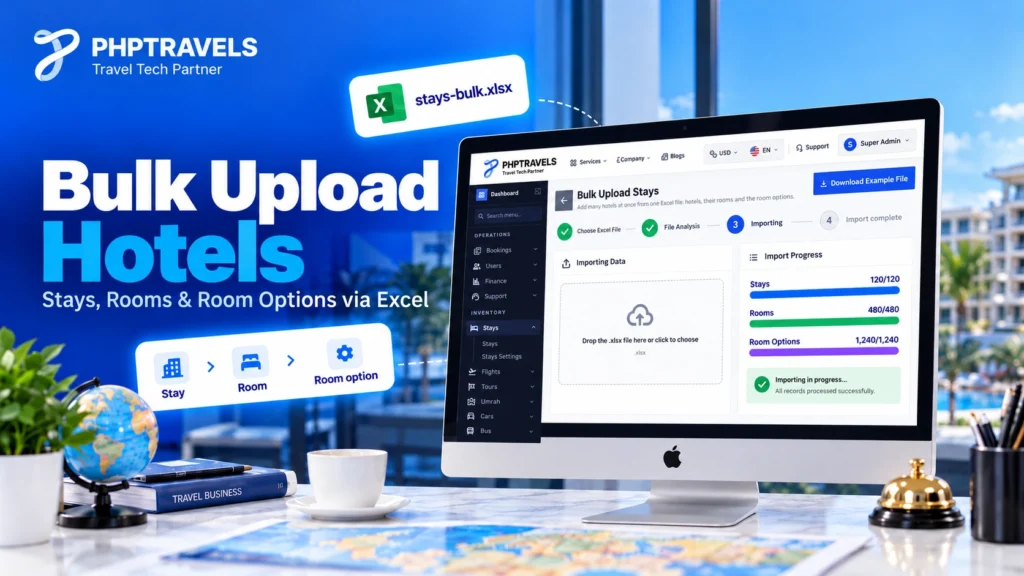
PHPTRAVELS now lets admins bulk upload hotels from one Excel file. The new Upload Bulk button on the Stays list opens a guided uploader. It imports hotels, their rooms and every room option in a single pass, and the counters show your progress live. Before anything is saved, it checks for duplicates. This guide covers what the PHPTRAVELS Stays bulk upload does, how the three linked sheets fit together, and how to prepare a file that imports cleanly the first time.
What the PHPTRAVELS Stays Bulk Upload Does
Until now, adding a hotel in the PHPTRAVELS Stays module meant going through the admin form one property at a time: the hotel itself, then each room, then each sellable option for that room. That works for five hotels, but it becomes a bottleneck for an agency or tour operator loading a contracted portfolio of fifty or five hundred.
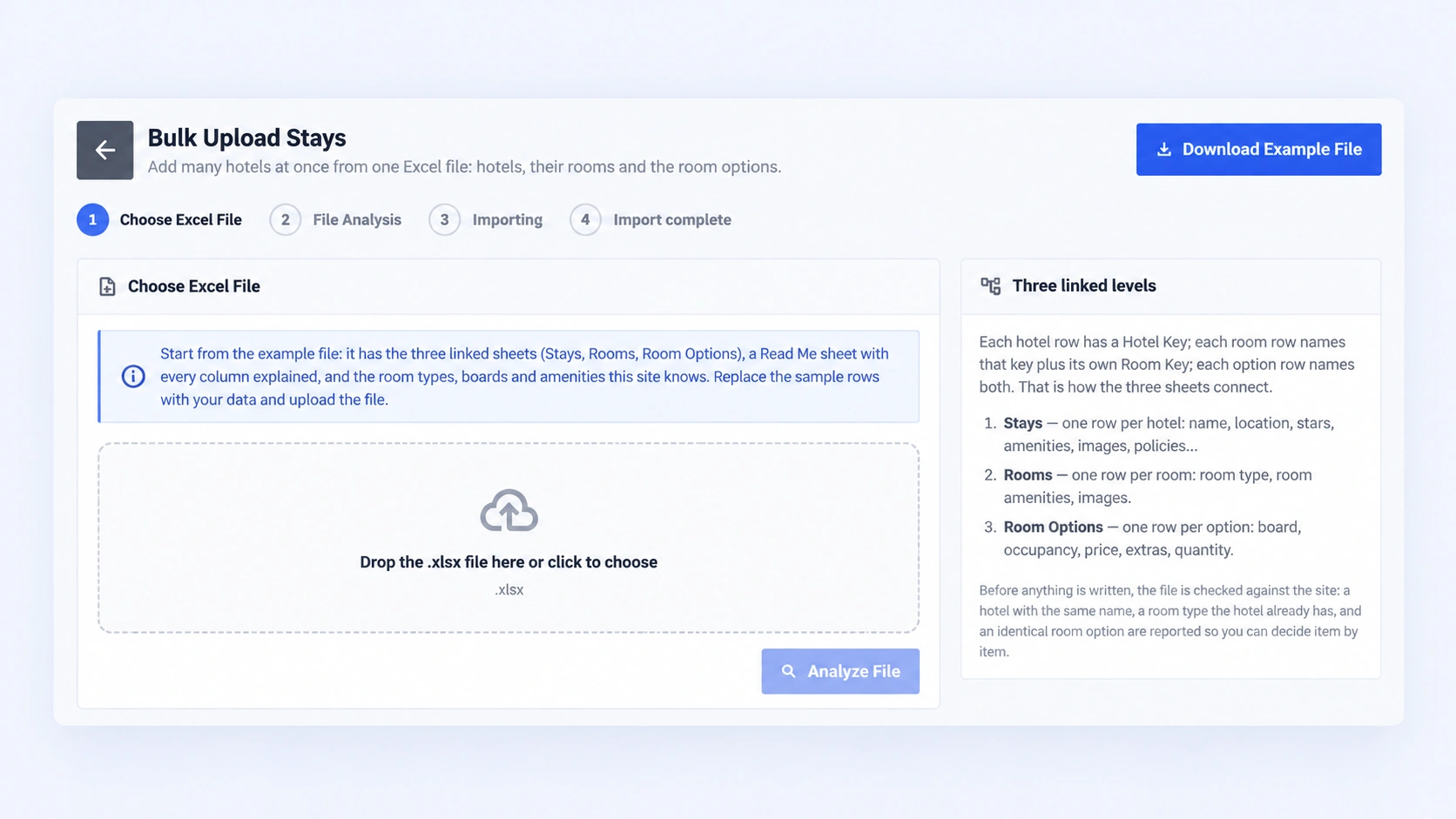
The new feature lives at /admin/stays/upload-bulk. To reach it, open Admin → Stays and click the green Upload Bulk button next to Create New. The page is titled Bulk Upload Stays, and it gives you:
- A Download Example File button at the top right. It gives you a ready-made .xlsx template.
- A side panel, Three linked levels, that explains how the sheets connect, and a Names this site knows panel listing accommodation types, room types, boards, hotel and room amenities, and currencies.
- A three-level import: Stays → Rooms → Room Options, all kept linked to each other.
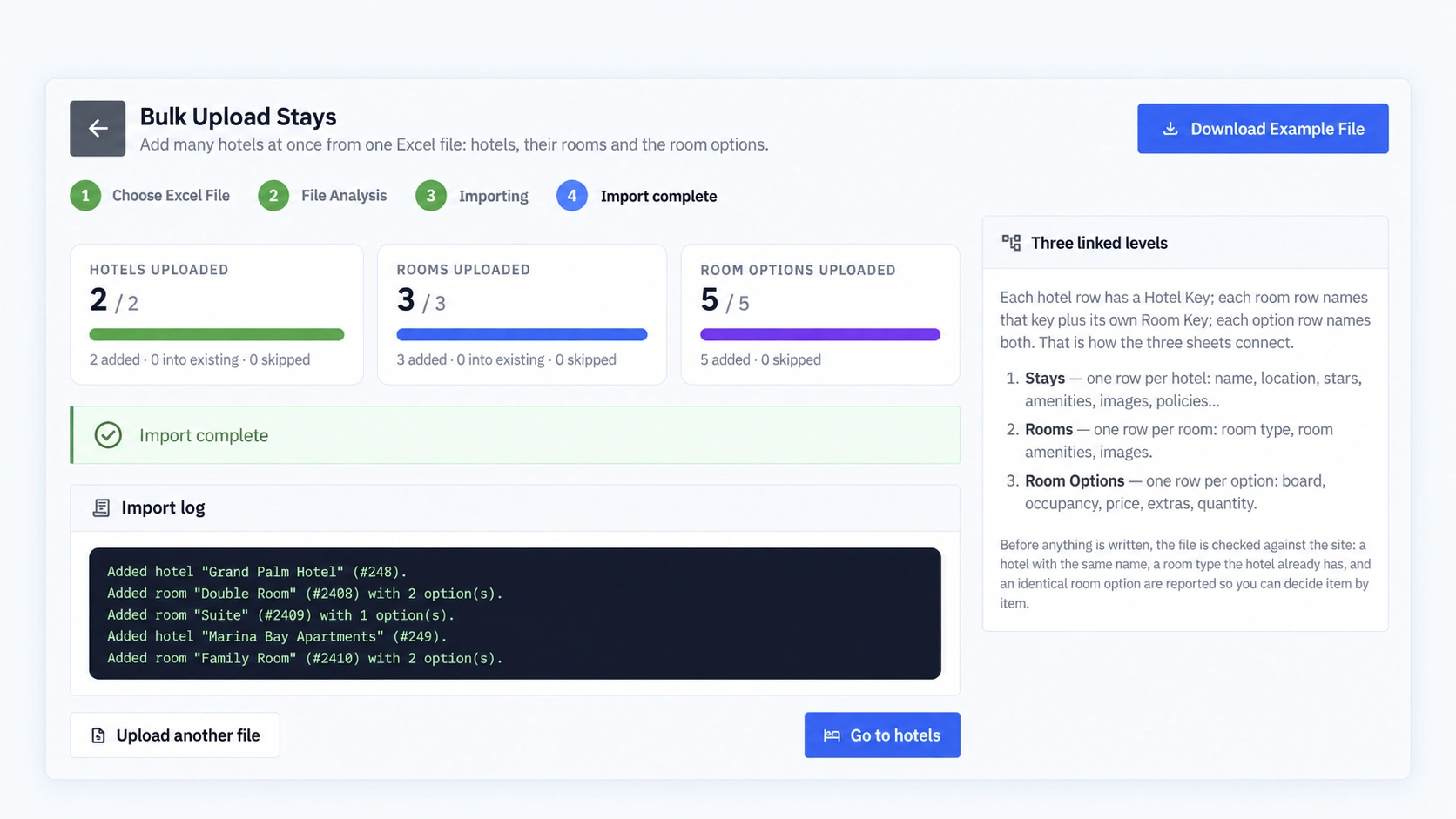
- A four-step flow: Choose Excel File, File Analysis, Importing, Import complete.
- Live counters for hotels, rooms and room options while the import runs, plus an import log of every record created.
- A duplicate check before anything is written. For each flagged item, you choose whether to duplicate or skip it.
This fits the manual inventory workflow that many PHPTRAVELS operators start with. It covers properties you contract directly, alongside any hotel supplier APIs you connect.
Why Bulk Upload Hotels Instead of Adding Them One by One
Most PHPTRAVELS admins already keep their direct-contract hotels in a spreadsheet: names, cities, star ratings, room types, meal plans and net or selling rates. Re-typing that data into a web form is slow, and it introduces errors such as a misspelt room type, a price in the wrong field, or a room attached to the wrong hotel.
Uploading the same spreadsheet in bulk solves three practical problems:
- Time to launch. A new storefront or season goes live when its inventory is loaded, not after days of data entry.
- Consistency. The example file lists the room types, boards and amenities your PHPTRAVELS site already knows. Your values then match what the storefront filters and displays.
- Safe re-imports. Because duplicates are detected before writing, uploading the same file twice by mistake does not silently double your hotel list.
If you sell hotels from a mix of direct contracts and connected suppliers, our guide to a multi-supplier hotel booking engine explains how these sources sit side by side.
How the Three-Level Excel Structure Works
The example workbook has four sheets. Stays, Rooms and Room Options hold your data. A Read Me sheet explains every column and lists the accepted values for room types, boards and amenities. Always treat the Read Me sheet in your own download as the authoritative column reference. The tables below show how the levels connect.
The link between sheets is a set of keys. Each hotel row has a Hotel Key. Each room row repeats its hotel’s key and adds its own Room Key. Each room option row names both keys. This is what lets one file describe a whole hotel, room by room and option by option, without any ambiguity about what belongs where.
Sheet 1: Stays (one row per hotel)
Stays hold the property-level details: name, location, star rating, amenities, images and policies.
| Hotel Key | Hotel Name | Type | Location | Stars | Amenities | Images | Policies |
|---|---|---|---|---|---|---|---|
| H001 | Marina View Hotel | Hotel | Dubai, UAE | 4 | Free WiFi, Swimming Pool, Gym/Fitness Center | image URLs | Check-in 14:00, check-out 12:00 |
| H002 | Old Town Guest House | Guest House | Istanbul, Turkey | 3 | Free WiFi, 24-Hour Front Desk | image URLs | No smoking |
The accommodation types shown on the uploader are Hotel, Apartment, Villa, Resort, Guest House, Hostel, Chalet, Cottage, Bungalow and Holiday Home. Hotel amenities include Free WiFi, Swimming Pool, Parking, Restaurant, Gym/Fitness Center, Spa, 24-Hour Front Desk, Airport Shuttle, Bar/Lounge and Conference Rooms.
Sheet 2: Rooms (one row per room type, linked by Hotel Key)
Rooms hold the room type, room-level amenities and room images.
| Hotel Key | Room Key | Room Type | Amenities | Images |
|---|---|---|---|---|
| H001 | H001-R1 | Double Room | Air Conditioning, Mini Bar | image URLs |
| H001 | H001-R2 | Suite | Balcony, Coffee/Tea Maker | image URLs |
| H002 | H002-R1 | Twin Room | Air Conditioning, Safe | image URLs |
The room types the uploader lists are Single Room, Double Room, Twin Room, Triple Room, Family Room, Suite, Deluxe Room, Executive Room, King Room and Queen Room. Room amenities include Air Conditioning, Flat-screen TV, Mini Bar, Safe, Private Bathroom, Balcony, Coffee/Tea Maker, Hairdryer, Work Desk, and Iron and Ironing Board.
Sheet 3: Room Options (one row per sellable option, linked by both keys)
Room options are what a guest actually books: a board basis, the occupancy, a price, any extras and the quantity available.
| Hotel Key | Room Key | Board | Occupancy | Price | Currency | Extras | Quantity |
|---|---|---|---|---|---|---|---|
| H001 | H001-R1 | Room Only | 2 adults | 120 | USD | — | 10 |
| H001 | H001-R1 | Bed & Breakfast | 2 adults | 145 | USD | Late checkout | 10 |
| H002 | H002-R1 | Half Board | 2 adults | 95 | EUR | — | 6 |
The boards are Room Only, Bed & Breakfast, Half Board, Full Board, All Inclusive and Self Catering. The currencies shown on the uploader screen are USD, GBP, SAR, EUR, NGN, INR and EGP.
The example rows above are illustrative. Your template’s exact column headers come from the downloaded file. If you also map supplier room names, our post on hotel room mapping explains why consistent room types matter across sources.
Step-by-Step: Bulk Upload Hotels in PHPTRAVELS
- Open the uploader. Go to Admin → Stays and click the green Upload Bulk button beside Create New. You land on Bulk Upload Stays, with the four steps shown across the top.
- Download the example file. Click Download Example File and read the Read Me sheet first. It explains each column and lists the room types, boards and amenities your site recognises. You’ll see the same list in the Names this site knows panel.
- Fill the three sheets. Replace the sample rows with your data: hotels in Stays, rooms in Rooms and sellable options in Room Options. Keep the Hotel Key and Room Key values consistent across sheets.
- Step 1 – Choose Excel File. Drop your .xlsx onto the area marked Drop the .xlsx file here or click to choose, then click Analyze File.
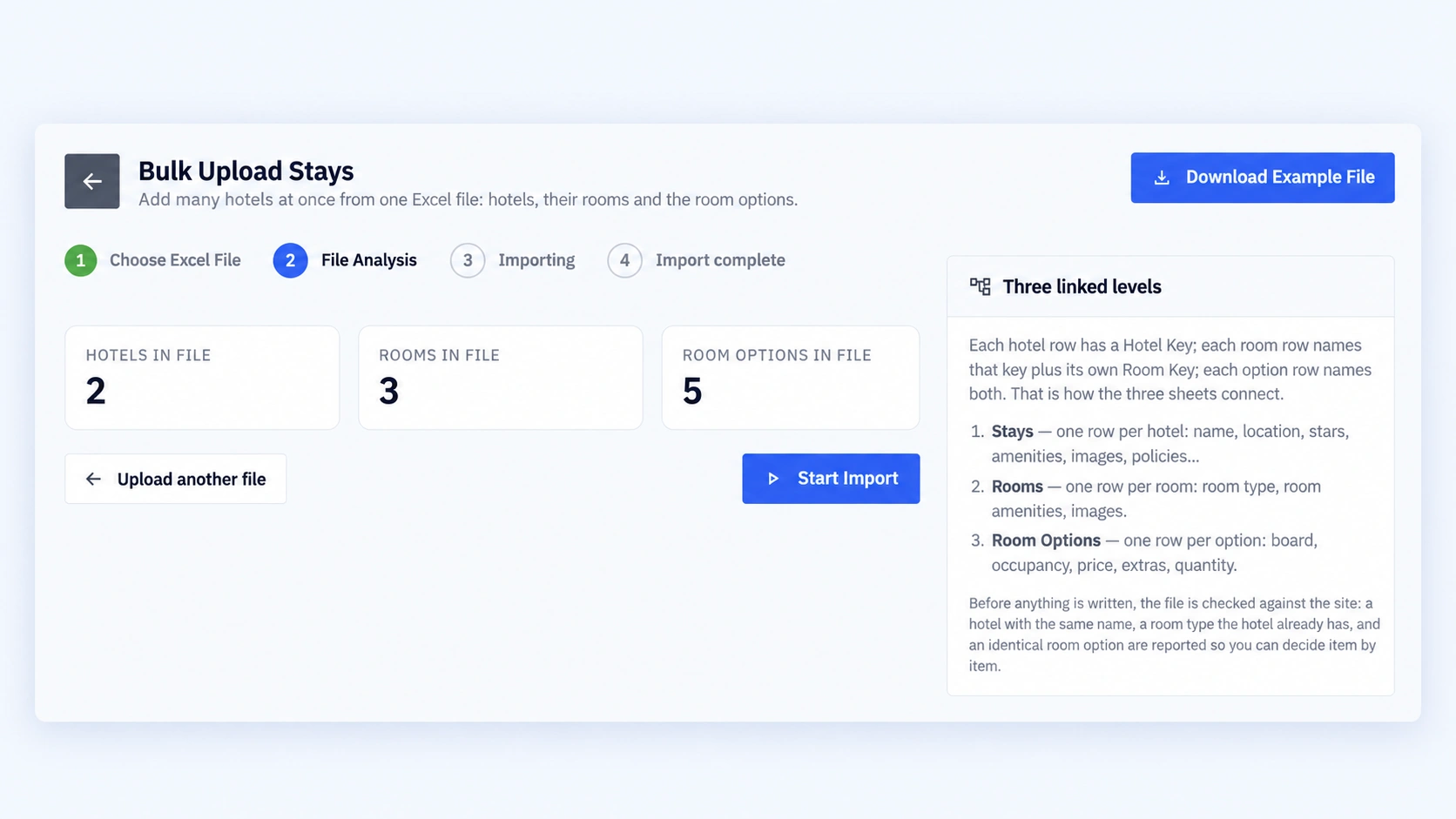
- Step 2 – File Analysis. PHPTRAVELS reads the workbook and shows what it found in three cards: Hotels in file, Rooms in file and Room options in file. Nothing has been written yet. Any duplicates are reported here so you can decide per item whether to duplicate or skip. Click Start Import to continue, or Upload another file to go back and fix your sheet.
- Step 3 – Importing. Watch the live counters for hotels, rooms and room options climb as records are created.
- Step 4 – Import complete. Each card shows the total processed (for example Hotels uploaded 2 / 2) with a breakdown of added, into existing and skipped. Below them, the Import log lists every record created, such as Added hotel “Grand Palm Hotel” and Added room “Double Room” with 2 option(s). Click Go to hotels to review the new stays, or Upload another file to start the next batch.
How Duplicate Detection Protects Your Inventory
A common accident is uploading the same file twice, or re-uploading a file that has a few new rows added to old ones. PHPTRAVELS catches this during File Analysis, before any data is saved. It flags three kinds of duplicate:
- Hotel: a stay with the same hotel name already exists.
- Room: the hotel already has a room of that room type.
- Room option: an identical room option already exists on that room.
These checks run at the File Analysis step. Each flagged item is listed, and you decide per item whether to duplicate it or skip it. This matters in practice. You might deliberately want a second “Double” room at a hotel, for example a different view category with its own images. Meanwhile, you’d skip the accidental repeat of an entire property. Nothing is written until you have made those choices.
To clean your sheet before uploading, Excel’s own find and remove duplicates tool is a quick first pass on the Hotel Name and key columns.
Data Preparation Tips and Common Mistakes
Most failed or messy imports come down to a handful of avoidable issues:
- Broken keys. A room whose Hotel Key matches no Stays row, or an option whose Room Key matches no room, has nothing to attach to. Use a simple, predictable pattern such as H001 and H001-R1, and never reuse a key for two different hotels.
- Free-typed values. “BB”, “B&B” and “Bed and breakfast” are three different strings. Copy room types, boards and amenities exactly as listed in the Read Me sheet. Excel’s data validation drop-down lists make this almost automatic.
- Currency mix-ups. State the currency on every option row, using one of the currencies your site supports, and check that prices are numbers rather than text such as “$120”.
- Renamed headers. Keep the template’s column headers and sheet names as they are, and add rows rather than restructuring the file.
- Heavy first runs. For your first import, try a small file of two or three hotels. Confirm they look right on the storefront, then upload the full portfolio.
For agencies planning a wider hotel catalogue, TravelBookingPortal’s hotel booking system overview outlines how direct-contract inventory fits into a full hotel booking setup.
Who the Stays Bulk Upload Is For
- Tour operators and DMCs with direct hotel contracts they want bookable on their own PHPTRAVELS storefront.
- Travel agencies moving an existing hotel spreadsheet into PHPTRAVELS during onboarding.
- OTAs and B2B portals adding a seasonal batch of properties or new destinations quickly.
- Admins migrating from another system who can export hotels, rooms and rates into the three-sheet format.
Bulk upload is for inventory you load yourself. Live supplier inventory still comes through the hotel APIs you connect with your own supplier contracts. See the integrations page for the current list, or explore the PHPTRAVELS hotels module. If you are still working out how to sell your properties online, read how to sell hotels online.
See PHPTRAVELS Bulk Upload in Action
The fastest way to judge whether the Stays bulk upload fits your workflow is to see the admin panel yourself. Book a PHPTRAVELS demo to walk through the Stays module. When you are ready to plan your setup, configure your package on the pricing page.
Frequently Asked Questions
Where is the bulk upload option in PHPTRAVELS?
In the admin panel, open Stays and click the green Upload Bulk button next to Create New. It opens the Bulk Upload Stays page at /admin/stays/upload-bulk.
Can I upload hotels, rooms and room options in one file?
Yes. The example workbook has linked Stays, Rooms and Room Options sheets. Hotel Key and Room Key values connect each room to its hotel and each option to its room.
What happens if I upload the same Excel file twice?
During File Analysis, PHPTRAVELS flags hotels with the same name, rooms with a room type the hotel already has, and identical room options. You decide per item whether to duplicate or skip before anything is saved.
Which room types and meal plans are supported?
The uploader lists room types Single Room, Double Room, Twin Room, Triple Room, Family Room, Suite, Deluxe Room, Executive Room, King Room and Queen Room. The boards are Room Only, Bed & Breakfast, Half Board, Full Board, All Inclusive and Self Catering. The Read Me sheet in your template is the definitive list for your site.
Can I watch the import progress?
Yes. During Importing, separate live counters show progress for hotels, rooms and room options. When it finishes, each counter breaks the total down into added, into existing and skipped, and an import log lists every record created.
Does bulk upload give me hotel inventory?
No. It imports hotels you already have, such as direct contracts or your own properties. Supplier inventory comes from hotel APIs connected with your own supplier agreements.