To download hotel details as a PDF, open the hotel page and look for a download or “save details” option. If the website offers one, it usually builds a clean document with the hotel description, rooms and prices. If it does not, your browser’s print dialog can save the page as a PDF, although the layout is often messy. Once you have the file, you can email it, send it on WhatsApp or keep it for later. Remember that any price in the PDF is a snapshot from the moment you saved it.
This guide covers what a useful hotel information PDF contains, when to send a branded or non-branded version, how to share hotel details with clients on each channel, and the accuracy checks that keep a saved quote from turning into a complaint.
Contents
- What a hotel details PDF should include
- Why agencies and travellers save hotel details as a PDF
- How to download hotel details as a PDF
- Branded or non-branded: which PDF to send
- How to share hotel details with clients
- Prices, availability and what a PDF is not
- A practical workflow for travel agencies
- Checklist before you send
- How PHPTRAVELS handles hotel details PDFs
- Frequently asked questions
What a hotel details PDF should include
A hotel PDF is only useful if the person reading it can make a decision without opening five other tabs. For most trips, that means the document needs to answer three questions: where is the hotel, which room am I looking at, and what will it cost.
Hotel information
- Hotel name, star rating and full address
- A short description and the main facilities (pool, breakfast, parking, airport transfer)
- Check-in and check-out times, if the page shows them
- One or two photos, so the client can recognise the property
Rooms and prices
- Room type and bed configuration
- Board basis, such as room only or breakfast included
- The price, the currency and whether taxes are included
- Cancellation terms for each rate, because two rooms with the same price can have very different refund rules
- The travel dates and number of guests the price was calculated for
Context the reader needs
- The date and time the details were saved
- Who to contact to book or ask questions
- A clear note that the prices are not confirmed until a booking is made
If a document leaves out the dates or the guest count, a price on it means very little. A double room for two adults in March is a different product from the same room for a family in August.
Why agencies and travellers save hotel details as a PDF
A link to a hotel page is quick to send, but it has weaknesses. The client may open it days later and see different prices, a different currency or a login wall. Screenshots are worse: they cut off room details, they are hard to read on a phone, and they look improvised.
A PDF solves a few practical problems:
- It fixes what you discussed. When a client asks “what was the price you showed me on Tuesday?”, the file answers it.
- It is easy to compare. A family choosing between three hotels can open three files side by side, or forward them to the person paying.
- It works across devices. PDFs open on phones, laptops and office computers without special software.
- It looks professional. For an agency, a tidy document with clear room options builds more trust than a forwarded booking site link.
Travellers benefit too. If you want to save hotel details for later, for example while waiting for leave approval or a visa decision, a PDF keeps your shortlist in one place instead of scattered across browser tabs.
How to download hotel details as a PDF
There are two common routes. Which one you use depends on what the website offers.
Option 1: a built-in download button
Some hotel booking websites include a download option on the hotel details page. Not every site does, so check before assuming. Where it exists, the steps are usually similar:
- Search for your destination and dates, then open the hotel you are interested in.
- Choose the room or rooms you want to include. Some sites let you include all available rooms.
- Click the download option and save the file to your device.
- Open the file and confirm the dates, guest count and prices match what you selected.
A built-in option normally produces a cleaner result, because the website controls the layout and leaves out menus, banners and cookie notices.
Option 2: print the page to PDF
If there is no download button, most desktop and mobile browsers can save a page as a PDF through the print dialog. Choose print, then select “Save as PDF” (or the equivalent on your device) as the destination.
This works, but expect some cleanup issues:
- Room lists that load only when you scroll or click may be missing.
- Navigation, ads and pop-ups can appear in the file.
- Long pages can split awkwardly across many pages.
Before sending a printed page to a client, scroll through every page of the PDF. If the room you recommended is not visible, the file is not ready.
Branded or non-branded: which PDF to send
For travel agencies, the choice between a branded hotel PDF and a plain one matters more than it first appears.
| Situation | Better choice | Why |
|---|---|---|
| Sending options directly to your own client | Branded | Your logo, phone number, email and website make it obvious who to contact to book. |
| Sharing with a sub-agent or partner who sells to their own client | Non-branded | The partner can pass it on without your company details appearing. |
| Internal comparison or team review | Either | Branding adds nothing internally, so a plain file is fine. |
| A traveller saving options for personal use | Non-branded | Only the hotel information is needed. |
A branded document also protects your work. When a client forwards your shortlist to a relative, your contact details travel with it, so the enquiry comes back to you instead of going to whoever the relative finds first.
How to share hotel details with clients
Each channel suits a different kind of client. The best agencies ask clients which one they prefer and stick to it.
Email hotel details to customers when the decision involves several people, a company travel policy or a formal approval. Email keeps a searchable record, and the client can forward it to whoever pays. Keep files small: for example, Gmail limits attachments on personal accounts to 25 MB, so a PDF with dozens of high-resolution photos can cause problems.
Write a short summary in the email body, such as “Three options for 12 to 16 March, two adults, breakfast included. My recommendation is option two because it has free cancellation.” Many clients read the email before they open any attachment.
In many markets, clients expect to send hotel details on WhatsApp because that is where the conversation already happens. It is fast and personal, and clients tend to reply quickly. The downside is that files get buried in long chats. Add one line of context with each file, so the client can find “the Dubai options” a week later.
SMS
SMS is a fallback for clients who do not use WhatsApp or prefer not to share an email address. It is best treated as a way to point the client to the hotel details rather than a place for long messages. Keep the text short and say clearly who it is from.
Whatever the channel, avoid sending the same file through several channels at once. It looks careless and makes it harder to know which version the client is reading. If you are building repeatable messaging habits around WhatsApp, our guide to WhatsApp marketing for travel businesses covers the wider picture.
Prices, availability and what a PDF is not
This is the part that causes the most disputes, so it deserves plain language.
A downloaded PDF is a snapshot. It shows the prices and rooms that were available when it was saved. Hotel rates change with demand, and rooms sell out. The file on the client’s phone does not change when the live rate does.
A hotel details PDF is also not:
- a reservation or confirmed booking
- a hotel voucher
- a guarantee that the room or price will still be available
Make this clear every time. A simple line such as “Prices as of 22 October, 10:15. Not confirmed until booked” prevents most misunderstandings. When the client says yes, check the live price and availability again before taking payment, and tell them straight away if anything has changed.
The same applies to travellers. If you saved a hotel PDF two weeks ago, treat the price as a reference point, not an offer.
A practical workflow for travel agencies
Here is a simple process that works for most enquiries. Imagine a client asks for a four-night family hotel near the beach, with breakfast, for two adults and two children.
- Confirm the brief. Dates, guests, budget, location and must-haves. Write them down before you search.
- Shortlist two or three hotels. More than three usually slows the decision.
- Save one PDF per hotel. Include every room that fits the family, so the client can see the trade-off between, say, a family room and two connecting rooms.
- Choose branded or non-branded. Branded for your own client, plain for a partner.
- Send with a summary. One message, the files, your recommendation and a reason.
- Follow up. If you have not heard back in a day or two, ask a specific question, such as “Would breakfast included or a lower room-only rate suit you better?”
- Recheck before booking. Confirm the live rate, then book and send the actual confirmation.
If your team handles many enquiries like this, tracking which client received which options becomes a job in itself. A customer database or a tool such as Travel CRM System can keep the follow-ups and quote history together. For agencies that send formal priced proposals rather than hotel options, our article on travel quote management software explains the next step up.
Checklist before you send
- Dates, number of nights and guest count are correct
- Every room you mentioned is in the file
- Currency and tax notes are visible
- Cancellation terms are shown or summarised
- The save date is clear, with a note that prices are not confirmed
- Your contact details are on the file, or deliberately left off for a partner
- The file opens properly on a phone
- Your message explains what the client is looking at and what you recommend
How PHPTRAVELS handles hotel details PDFs
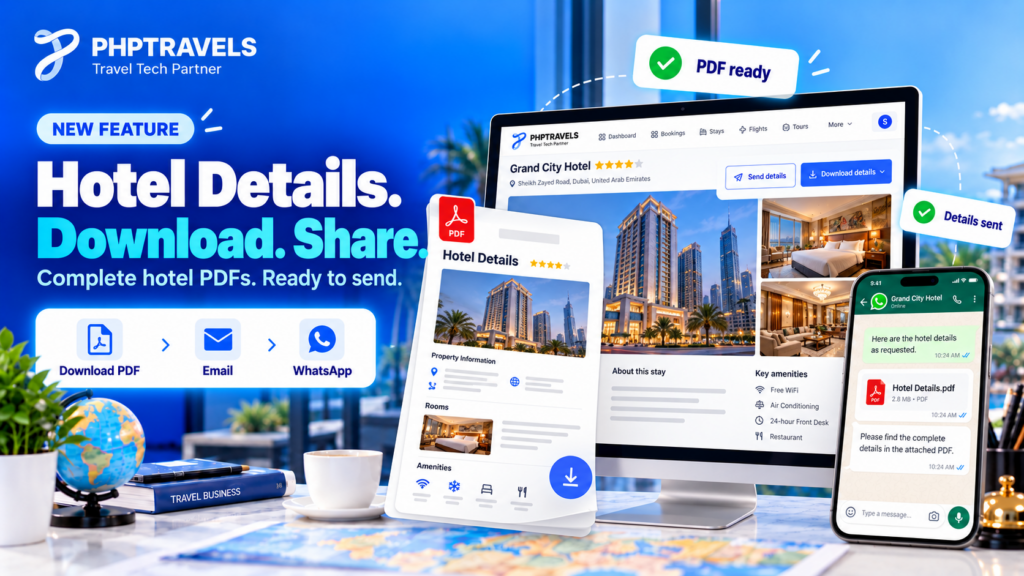
Everything above works with any process, including manual ones. For agencies running their own booking website, though, building PDFs by hand for every enquiry takes time. This is a feature PHPTRAVELS clients asked for, and it is now available to them through the latest update.
On a PHPTRAVELS-powered website, the option sits on the hotel details page in the Stays module:
- Download details creates a PDF with the hotel information, rooms and prices. An “All rooms” option includes every listed room in one file.
- Branded or non-branded: choose a branded PDF with your company logo, phone number, email and website, or a non-branded PDF with only the hotel details.
- Send details lets users share hotel details by Email, WhatsApp or SMS, so the recipient can access the complete PDF.
It is useful for three groups. Agencies can send consistent, branded options in seconds. Customers can save and share hotels they are considering. Website administrators get a ready-made way to turn browsing into enquiries without extra tools.
The accuracy rules still apply: the PDF reflects prices at the moment it is generated, and it is not a booking or voucher.
Frequently asked questions
Can I download hotel details as a PDF on any booking website?
No. Some websites have a built-in download option and many do not. Where there is none, your browser’s print to PDF function is the usual fallback, but check the result before sharing.
Is a hotel details PDF the same as a booking confirmation?
No. It is a summary of options. Only the confirmation or voucher issued after booking proves a reservation.
Does a downloaded PDF stay updated?
No. The file keeps the prices and rooms from the moment it was saved. Check the live rate before you book.
When should an agency use a non-branded PDF?
Mainly when sharing with partners or sub-agents who will pass the details to their own clients, or for internal use.
Can I share hotel details by SMS?
Yes, where the website supports it. Use SMS as a short way to give the client access to the hotel details, and keep longer explanations for email or a call.
See the workflow on a live booking website
If you want clients to download and share hotel details from your own website, with your branding on every file, the quickest way to judge it is to try it. Explore the PHPTRAVELS Demo to see hotel pages, rooms and sharing in action, and browse the PHPTRAVELS documentation for module details. Existing clients can access the feature by moving to the latest update.