A software update is a smaller change to existing software that fixes bugs, patches security issues, improves compatibility, or adds minor features. It usually keeps the same major software version.
A software upgrade is a larger move to a newer major version, often introducing significant new features, interface changes, performance improvements, or technical changes.
Software Update vs Upgrade
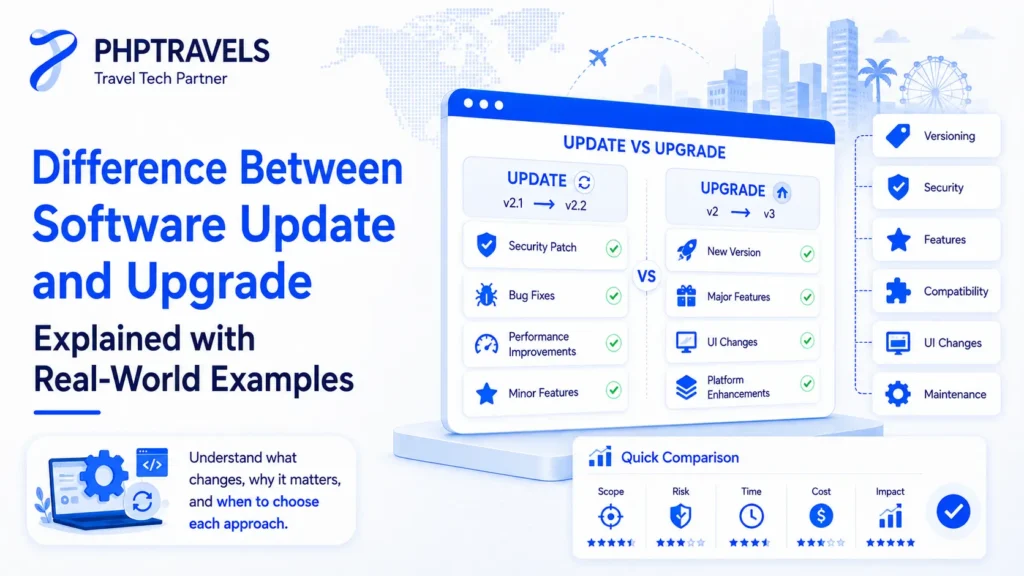
Software Update:
• Bug fixes
• Security patches
• Small improvements
• Same software version
Software Upgrade:
• New version
• New features
• UI changes
• Performance improvements
Definition:
- Software Update: A minor change or fix that improves an existing software version.
- Software Upgrade: A major change that replaces a software version with a newer, improved one.
Have you ever seen that pop-up telling you to “update your software” and then a week later, another one asking you to “upgrade”? While they sound similar, a software update and a software upgrade are two very different things. Understanding the difference is not just helpful it can save you time, protect your system, and even impact your business operations if you’re in the travel or tech industry.
| Feature | Software Update | Software Upgrade |
|---|---|---|
| Version change | Usually minor or patch version | Usually major version |
| Scope | Bug fixes and smaller improvements | Major features and broader changes |
| Size | Usually smaller | Usually larger |
| Cost | Often free | May be free or paid |
| Example | Security patch | Windows 10 → Windows 11 |
What Is the Difference Between a Software Update and Upgrade?
In short:
A software update makes small changes like bug fixes and security improvements without changing the core version, while a software upgrade replaces the entire version with a new one introducing new features, user interface changes, and performance improvements.
Example Scenario
Your Android phone receives a monthly security patch this is a software update.
When you move from Android 12 to Android 13 with a redesigned UI and major new features that’s a software upgrade.
What Is a Software Update?
A software update is a smaller release that improves an existing software product. Updates commonly fix bugs, patch security vulnerabilities, improve compatibility, enhance performance, or add minor features without replacing the software with a completely new major version.
- Fix bugs
- Patch security vulnerabilities
- Add minor feature improvements
- Improve compatibility with new hardware
They’re fast, lightweight, and typically free. Businesses using platforms like PHPTRAVELS depend on regular updates to keep real-time booking, global distribution systems, and travel APIs running smoothly.
Updates are especially critical in industries like travel tech, where system uptime and security directly affect customer experience.
Software Update Examples
Windows security patch
Android monthly patch
Chrome update
Antivirus definitions
What Is a Software Upgrade?
A software upgrade means moving from an older software version to a newer major release. An upgrade may introduce major features, interface changes, technical improvements, better performance, or new compatibility requirements.
- A redesigned interface
- Improved architecture
- Brand-new tools and features
- Enhanced performance and scalability
For example, shifting from a basic CRM to an advanced, AI-powered travel CRM integrated with booking engines and APIs is considered an upgrade.
Upgrades are essential when the software you use is no longer compatible with new devices, or when you want to adopt new features like dynamic pricing, real-time notifications, or multilingual support.
Software Upgrade Examples

Windows 10 → Windows 11

Android 12 → Android 13

PHP 7 → PHP 8

CRM basic → enterprise
Key Differences at a Glance
| Feature | Software Update | Software Upgrade |
|---|---|---|
| Scope | Minor fixes, improvements | Major overhaul and new features |
| Version Change | No | Yes (e.g., v2.1 → v3.0) |
| Installation Time | Few minutes | Could take hours |
| Size | KBs to 100s of MB | Often several GBs |
| Cost | Usually free | Sometimes free, sometimes paid |
| Example | Security patch | Moving from Windows 10 to Windows 11 |
What Are the Benefits of Upgrading Software?
Upgrades are not just optional they’re often critical for long-term growth and system security. Here’s why you should consider upgrading:
- Keeps your software compatible with new hardware and operating systems
- Improves user experience with better UI/UX
- Introduces automation and AI functionality
- Enhances security protocols
- Ensures compliance with global tech standards
In the context of travel software, upgrades allow platforms to stay ahead of emerging industry trends, API evolution, and multi-channel distribution needs.
According to Forbes Tech Council, businesses that delay critical upgrades are 60% more vulnerable to cybersecurity risks and operational breakdowns.
What Are the Different Types of Software Updates?
Understanding the kinds of updates can help you plan your system maintenance more strategically.
- Security updates: Fix vulnerabilities to prevent hacking or malware attacks.
- Feature updates: Add small enhancements or tweak existing tools.
- Maintenance updates: Improve performance, loading speed, and stability.
- Compatibility updates ensure the software works with new hardware, operating systems, and connected services such as travel APIs or airline distribution tools like Apollo GDS connectivity module.
Each type plays a vital role in keeping your system fast, secure, and aligned with evolving tech.
How Much Does It Cost to Upgrade Software?
It depends.
Most consumer-level software (like Android, macOS, or Windows) offers free upgrades.
However, enterprise and SaaS-level platforms often include upgrades in premium tiers, or charge separately if custom development is involved.
For example, an advanced travel booking CRM might offer basic features for free but charge for API access, reporting tools, or white-label customization as part of an upgrade.
The good news? PHPTRAVELS includes most feature upgrades in its subscription plans so you’re always on the latest version without hidden costs.
Final Thoughts
While both updates and upgrades improve your software, the scale and impact are very different. Updates are routine and essential for stability. Upgrades are strategic they unlock new capabilities and future-proof your systems.
If your business operates in a fast-moving industry like tourism or tech, staying current isn’t a luxury it’s a necessity. Platforms like PHPTRAVELS integrate ongoing updates and seamless upgrade paths to help agencies scale, stay secure, and offer a world-class user experience.
Want to know how modern travel software handles software lifecycle management, multi-supplier integrations, and AI-ready upgrades? Dive into the PHPTRAVELS platform and see how it’s shaping the next generation of travel automation.