Travellers lose booking emails, change phones and forget passwords. When that happens, the quickest fix is being able to find booking by Booking ID, straight from the website where they booked. PHPTRAVELS now includes exactly that: a simple booking lookup that lets customers open their booking details with nothing more than the Booking ID from their confirmation email or invoice.
This guide explains what the new feature does, how customers use it step by step, why it matters for travel agencies, and how existing Enterprise customers can get it as a free update.
Introducing the New Booking Lookup Feature
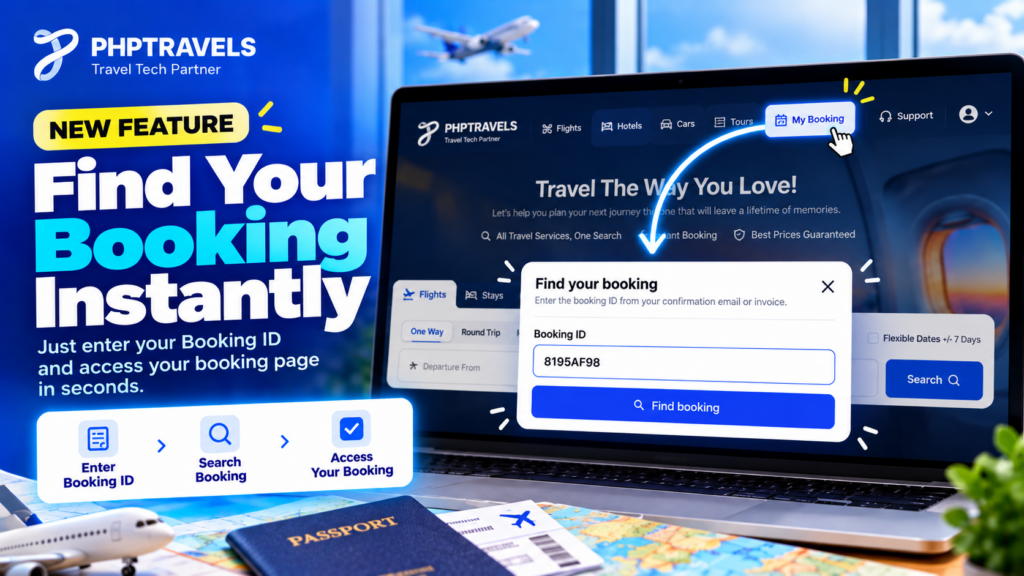
The PHPTRAVELS booking lookup adds a My Booking option to the header of websites powered by PHPTRAVELS. When a customer clicks it, a Find your booking popup opens. The customer types the Booking ID, clicks Find booking, and the system searches for that booking and takes them to its booking details page.
There is no account to create and no password to remember. Customers can access their booking information without signing in.
Why does this matter? Many travellers book as guests, or book once and never return to their account. Later they want to check booking status online, confirm their trip details or show the booking to someone else. If the only route is logging in or emailing the agency, a simple question becomes a support ticket. A booking ID search on the website itself gives customers a direct, self-service path to the information they already own.
How to Find Your Booking Using a Booking ID
The process is short and works the same way on any website running the updated PHPTRAVELS software:
- Visit the website. The customer opens the travel website where the booking was made, powered by PHPTRAVELS.
- Click “My Booking” in the header. The option sits in the website header, so it is easy to find from any page.
- The “Find your booking” popup appears. A small popup opens with a field for the Booking ID.
- Enter the Booking ID. The Booking ID is the reference shown in the customer’s booking confirmation email or invoice.
- Click “Find booking”. The system searches for the matching booking.
- View the booking details page. When the booking is found, the customer is redirected to the relevant booking details page.
That is the whole flow. No sign-in step, no extra form and no need to contact the agency just to see a booking.
Tip for agencies: make sure your confirmation emails and invoices show the Booking ID clearly, so customers know exactly what to type into the popup.
Why This Feature Matters for Travel Agencies
For a travel agency, every booking creates follow-up questions. Customers want to re-check what they booked, confirm details before travel, or find the booking again after losing the email. A find my booking online option answers many of these needs without staff involvement.
Customer convenience
Customers can reach their booking from the same website they booked on, at any time of day. They only need the Booking ID they already received, which is simpler than recovering an account.
Simpler booking retrieval
Guest bookings are common in travel. Without a lookup, a guest customer has few ways to get back to their booking except the original email. The online booking lookup system gives them a clear route through the website header.
Less friction
Every extra step, such as creating an account or resetting a password, is a point where customers give up and call or message instead. Removing the sign-in requirement keeps the experience short.
Fewer routine support requests
“Can you send my booking again?” is one of the most routine requests an agency receives. When customers can look up the booking themselves, some of these requests may never reach your team, leaving staff more time for questions that genuinely need a person.
Key Benefits of the PHPTRAVELS Booking Lookup Feature
- Easy to use: one header link, one popup, one field and one button. Customers do not need instructions beyond “use your Booking ID”.
- Quick booking access: after the search, the system redirects straight to the booking details page.
- No-login lookup: customers can view their booking information without signing in to an account.
- Part of your existing website: the feature lives in the header of the PHPTRAVELS-powered website, so it fits the experience your customers already know instead of sending them to a separate tool.
Self-service booking access has become a normal expectation for travellers. If you are reviewing which features matter most when comparing booking platforms, TravelBookingPortal’s feature overview is a useful checklist to read alongside your own requirements. For PHPTRAVELS specifically, you can browse the full list of PHPTRAVELS features to see how booking lookup fits with the rest of the travel booking management software.
Free Update for PHPTRAVELS Enterprise Customers
This is a PHPTRAVELS Enterprise update, and it comes at no extra cost. The booking lookup feature is included free of additional charge for all existing PHPTRAVELS Enterprise license customers.
If you already hold an Enterprise license, you do not need to buy anything new to use it. Download the latest software update and the feature becomes available on your website.
If you are not sure which license you have, or you want to know what each plan includes, check the PHPTRAVELS pricing page or contact the PHPTRAVELS team before planning your rollout.
How to Get the Latest PHPTRAVELS Update
Enterprise customers can get the feature by installing the latest PHPTRAVELS software update. A sensible general process looks like this:
- Back up first. Take a full backup of your website files and database before any update.
- Download the latest update through your usual PHPTRAVELS Enterprise update channel.
- Follow the official instructions. Use the PHPTRAVELS documentation for update guidance, and contact support if anything is unclear.
- Test the lookup. After updating, open your website, click My Booking in the header and search for a test Booking ID to confirm the popup and redirect work as expected.
- Tell your customers. Mention the new option in confirmation emails or on your help page so travellers know they can find their booking with the Booking ID.
If you have customised your theme or header, review those changes after the update so the My Booking link displays correctly.
Frequently Asked Questions
How can I find my booking using a Booking ID?
Go to the travel website where you booked, click “My Booking” in the header, enter your Booking ID in the “Find your booking” popup and click “Find booking”. You will be redirected to your booking details page.
Do customers need to log in to find their bookings?
No. Customers can access their booking information with the Booking ID, without signing in to an account.
Where can customers find their Booking ID?
The Booking ID is provided in the booking confirmation email or on the invoice.
Is the booking lookup feature free for Enterprise customers?
Yes. The feature is included free of additional charge for all existing PHPTRAVELS Enterprise license customers.
How can existing PHPTRAVELS customers access this update?
Existing Enterprise customers can download and install the latest PHPTRAVELS software update. After updating, the My Booking option and Find your booking popup become available on the website.
What happens after I click “Find booking”?
The system searches for the booking that matches your Booking ID and redirects you to the relevant booking details page.
Conclusion
The new feature to find booking by Booking ID gives travellers a fast, no-login way to reach their booking details from the website header, and gives agencies a simple way to cut routine “where is my booking” requests. For existing Enterprise customers it is a free update, so the only step is installing the latest release.
Want to see what else your travel website can do? Explore the latest capabilities of the PHP travel booking system at PHPTRAVELS, or try the live demo.