
Travel teams integrating Sabre usually face three challenges: getting the right API access, understanding which endpoints they need, and moving safely from sandbox testing to production.
This guide explains Sabre API access, authentication, core endpoints, testing, integration workflow, and production setup. For detailed commercial costs, see our Sabre API pricing breakdown.
Sabre API Pricing and Production Access
Something like:
Sabre sandbox access may be available for development and testing, while production access normally requires commercial approval and an agreement based on your business setup. Pricing can vary by market, booking volume, APIs, and commercial terms.
For a detailed explanation of costs, fees, and pricing factors, see our Sabre API Pricing Breakdown.
Sabre API Endpoints Explained
Sabre APIs are built around specific actions like searching flights, creating bookings, and managing passengers. Understanding the main endpoints helps you plan your integration properly.
Authentication
All API requests require secure authentication using tokens, client ID, and shared secrets.
REST APIs typically use token based authentication.
Air shopping
This is used to search available flights between locations.
It is the starting point of every booking flow.
PNR (Passenger Name Record)
This handles booking creation, passenger details, and itinerary management.
Every confirmed booking is stored as a PNR.
Queue and booking management
Sabre uses queue systems to manage bookings, ticketing processes, and operational workflows.
This is important for agencies handling high booking volumes.
Other common APIs
- Seat availability
- Fare rules
- Ticketing
- Cancellation and refunds
Each endpoint plays a role from search to final ticket issuance.
Common Sabre API Endpoints and What They Do
| API area | Purpose |
|---|---|
| Authentication | Generate credentials/token |
| Air shopping | Search flight availability |
| Pricing | Validate fares |
| PNR | Create/manage reservations |
| Queue | Manage agency workflows |
| Ticketing | Issue/manage tickets |
| Hotel APIs | Search/book hotel inventory |
Common Sabre API Endpoints Developers Use
Developers working with Sabre APIs usually interact with a few core endpoints. You do not need to learn everything at once, just understand what each one is used for.
Authentication endpoint
This is the first step in every integration.
It is used to generate a secure token so your system can talk to Sabre APIs.
Without authentication, no API request will work.
Air shopping endpoint
This is used to search flights between two locations.
It returns available airlines, prices, and flight options.
This is usually the starting point of any booking flow.
PNR endpoint
PNR stands for Passenger Name Record.
This endpoint is used to create and manage bookings.
It stores passenger details, itinerary, and booking status.
Queue and place endpoint
This is used by travel agencies to manage bookings inside Sabre.
It helps:
- Move bookings into queues
- Process ticketing
- Handle operational tasks
This is more important for B2B agencies handling large volumes.
REST endpoints
Sabre provides modern REST APIs that are easier to use compared to older SOAP APIs.
Most new integrations use REST because:
- Faster to implement
- Easier to maintain
- Better for web and mobile apps
How to Get Sabre API Access
Getting access to Sabre APIs is not instant for production. There is a process you need to follow.
Step 1: Create a developer account
Go to the Sabre developer portal and sign up.
This gives you access to the sandbox environment.
Step 2: Start with sandbox
You can begin testing APIs immediately using sandbox credentials.
This is where you build and validate your integration.
Step 3: Request specific APIs
You must request access to APIs based on your use case, such as flight search or booking APIs.
Step 4: Approval process
To move forward, Sabre may require:
- Business verification
- Travel credentials such as IATA or partner setup
- Clear use case of your platform
Step 5: Get production access
Once approved:
- You sign a commercial agreement
- Receive live credentials
- Enable real bookings
Without this step, your integration will stay limited to testing only.
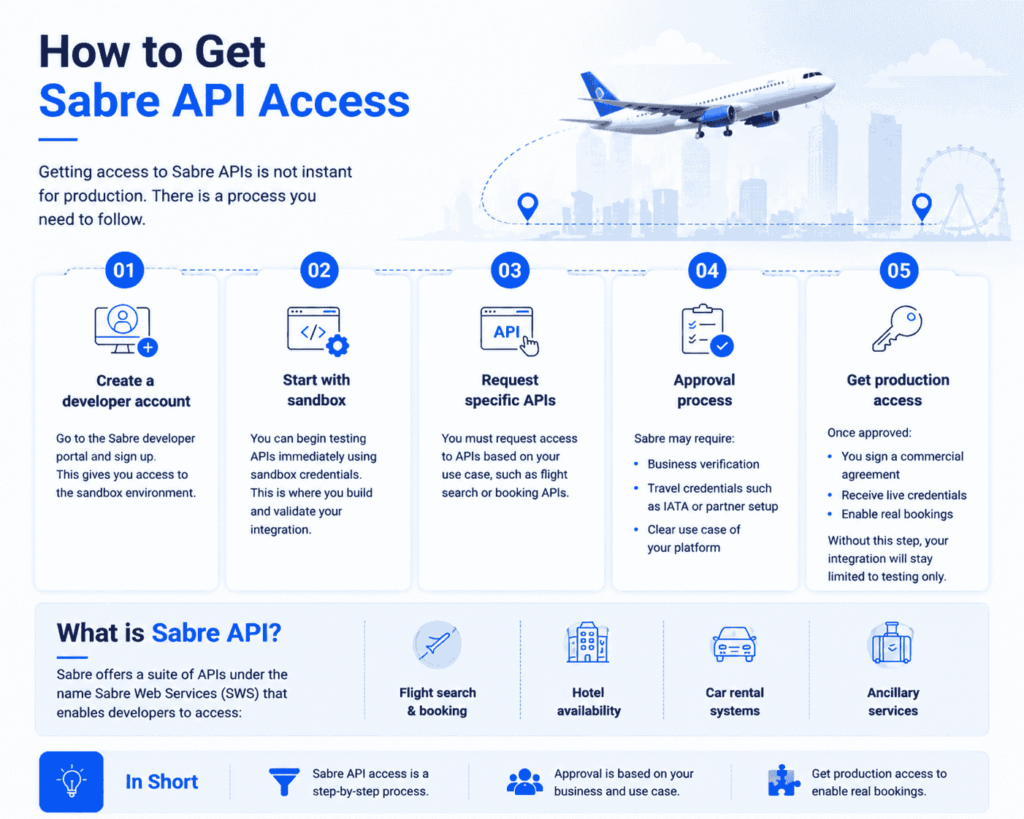
What is Sabre API?
Sabre offers a suite of APIs under the name Sabre Web Services (SWS) that enables developers to access:
- Flight search & booking
- Hotel availability
- Car rental systems
- Ancillary services
It’s one of the top GDS providers globally, along with Amadeus and Travelport.
Step-by-Step Sabre API Integration
Step 1: Register with Sabre Developer Portal
- Sign up for a developer account
- Access the sandbox environment for testing
Sabre API Travel Platform DemoSee how a Sabre-ready booking platform works in real time
Explore flight search, booking flows, supplier API connections, B2B modules, travel agency tools, and automation features inside a ready-to-launch travel portal.
View Live Demo →Note: You’ll need to request access to specific APIs depending on your use case (e.g., Air Shopping, OTA_HotelSearch).
Step 2: Get Your Credentials
Once your account is approved:
- You’ll get a SOAP or REST API key
- Use the API token, Client ID, and Shared Secret
Sandbox credentials allow you to build and test your integration before going live.
Step 3: Choose Between SOAP & REST APIs
Sabre offers:
- REST APIs Modern, easier to implement
- SOAP APIs Used in legacy systems, still supported
We recommend REST for new integrations.
Step 4: API Implementation Example (Flight Search)
Endpoint (REST):
GET /v1/shop/flights?origin=LHE&destination=DXB&departuredate=2025-10-05Sample Response:
{
  "PricedItineraries": [
    {
      "Airline": "EK",
      "Price": "420.00",
      "Stops": 0,
      "Duration": "3h 45m"
    }
  ]
}
Add error handling, retries, and logging in your code for production use.
Step 5: Go Live
Once your integration passes QA:
- Request access to the production environment
- Complete any commercial agreements
- Use your live credentials in your application
Sabre API Error Handling in Production
When integrating Sabre APIs, error handling is critical to ensure your booking system remains stable and reliable.
Sabre returns structured error responses when something goes wrong, such as invalid parameters or expired authentication tokens.
Common error scenarios:
- Invalid or expired authentication token
- Incorrect API request format
- Missing required parameters
- Service downtime or timeout
Best practices to handle errors:
- Always check API response status before processing data
- Add retry mechanism for temporary failures
- Log all failed API requests for debugging
- Handle token expiration automatically
Proper error handling ensures smooth flight search, booking, and ticketing operations.
Common Use Cases for Sabre API Integration
- B2C travel booking engines
- B2B travel agency platforms
- Hotel + flight combo portals
- Custom CRM tools for travel management
Who Uses Sabre API Integration?
Sabre API integration is commonly used by:- B2C travel booking websites
- B2B travel agency portals
- Flight booking mobile apps
- Corporate travel systems
- Hotel + flight booking engines
- Travel ERP and CRM platforms
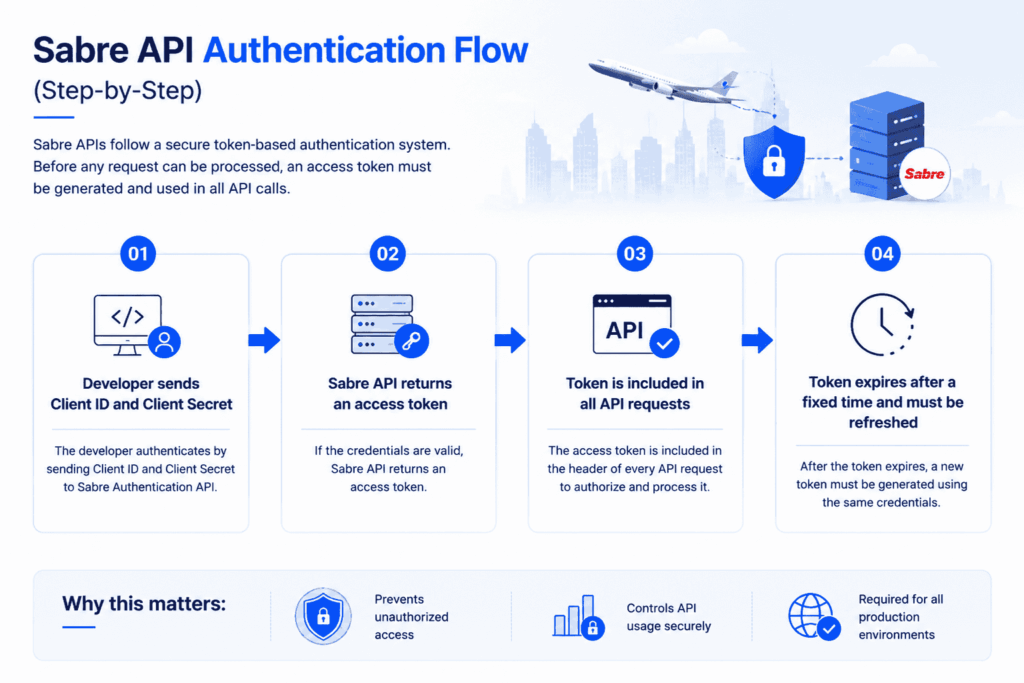
Sabre API Authentication Flow (Step-by-Step)
Sabre APIs follow a secure token-based authentication system. Before any request can be processed, an access token must be generated and used in all API calls.
Authentication flow works like this:
- Developer sends Client ID and Client Secret
- Sabre API returns an access token
- Token is included in all API requests
- Token expires after a fixed time and must be refreshed
This ensures secure access to Sabre’s flight, hotel, and booking systems.
Why this matters:
- Prevents unauthorized access
- Controls API usage securely
- Required for all production environments
What Affects Sabre Integration Complexity?
Then talk about technical scope:
- flight-only integration
- flights + hotels
- B2B functionality
- ticketing
- PNR management
- back office
- mobile apps
Tips for Optimizing Sabre API Usage
- Use caching where applicable to reduce API hits
- Paginate results for large searches
- Monitor API limits to avoid throttling
- Always keep your certificates and tokens secure
Common Sabre API Error Codes
| Error Code | Meaning | Solution |
|---|---|---|
| 400 | Bad Request | Check request format and parameters |
| 401 | Unauthorized | Regenerate or refresh authentication token |
| 404 | Not Found | Verify endpoint URL |
| 500 | Server Error | Retry request or check Sabre system status |
| 503 | Service Unavailable | Temporary Sabre downtime, retry later |
Need Sabre API integration without building from scratch?
PHPTRAVELS provides ready travel software with flight booking engine, supplier APIs, B2B modules, hotel systems, automation workflows, mobile apps and travel management tools already built in.
See Pricing →Final Thoughts
Integrating Sabre GDS can open the door to powerful travel inventory and scalable business operations. With the steps above, your developers can confidently begin the integration process.
Need help with faster integration or white-label travel portals? Contact PHPTRAVELS we specialize in Sabre API integration.