
Travel agencies do not need to own hundreds of vehicles to sell car rentals online. They can sell their own fleet, work directly with rental companies, or connect to car rental suppliers and aggregators through APIs.
In simple terms, selling car rentals online requires seven things: inventory, accurate availability, pricing, a booking engine, payment processing, automated confirmation, and reliable post-booking support.
The technology must connect these pieces so that a customer can search for a car, compare available vehicle classes, understand the rental conditions, pay or reserve, and receive confirmation without your team manually checking every request.
For travel agencies, OTAs, DMCs and tour operators, car rentals can also complement flights, hotels, airport transfers and tours within the same booking journey.
How Does Selling Car Rentals Online Work?
An online car rental booking starts when a traveler provides a pickup location, drop-off location, rental dates and driver information.
Your booking platform then checks available inventory from your own fleet or connected suppliers. It displays eligible vehicle classes, rates, mileage rules, insurance options, deposits, extras and other rental conditions.
Before the reservation is confirmed, the system should revalidate the current availability and price. After successful booking or payment, the traveler receives a confirmation or voucher containing the information required for pickup.
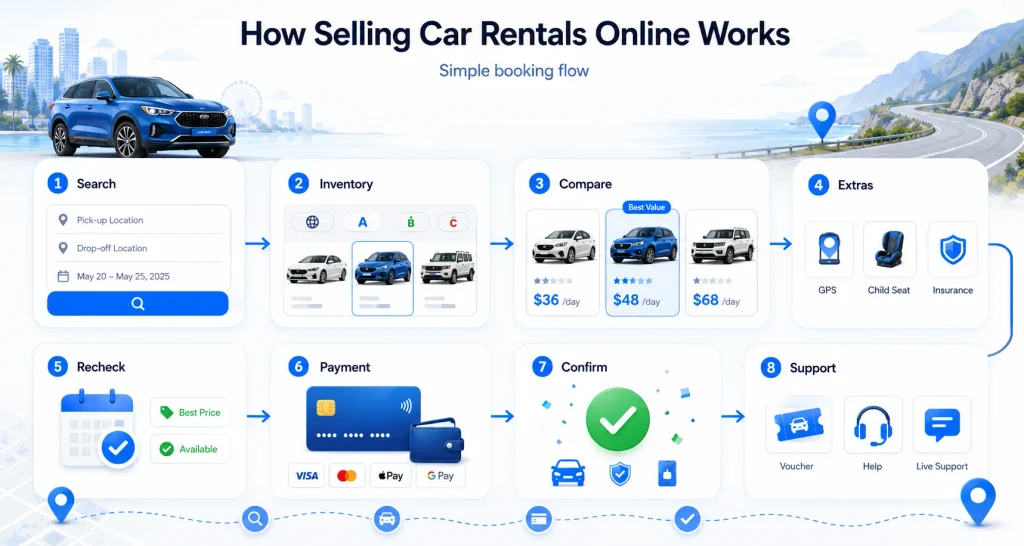
The basic flow is:
- Customer searches by pickup location, drop-off location and dates.
- Your system requests available vehicles from the relevant inventory source.
- Vehicles and prices are normalized for comparison.
- The customer selects a vehicle and optional extras.
- Availability and price are rechecked.
- Payment, deposit or reservation details are collected.
- The supplier confirms the rental.
- A booking confirmation or voucher is generated.
- Your team manages amendments, cancellations and support when required.
A dedicated car rental system can centralize these booking and operational workflows instead of forcing staff to handle reservations through spreadsheets, email and separate supplier dashboards.
1. Choose How You Will Source Car Rental Inventory
Before building the website, decide where the vehicles customers see will come from.
There are three common models.
| Model | How It Works | Best For |
|---|---|---|
| Own Fleet | You manage your own vehicles, rates and availability | Car rental operators |
| Direct Supplier Contracts | Rental companies give your business negotiated inventory or rates | Agencies with established supplier relationships |
| Aggregator / API Inventory | One connection can provide access to inventory from multiple rental suppliers | OTAs, travel agencies and businesses expanding quickly |
A hybrid model is also possible. For example, a travel company might sell contracted local inventory in its home market while using an aggregator for international destinations.
The right option depends on your destination coverage, booking volume, commercial agreements and the amount of operational control you need.
2. Connect Car Rental Suppliers or Aggregators
If you do not operate your own fleet, supplier connectivity becomes the foundation of the business.
Car rental inventory may come from brands, regional suppliers, wholesalers or aggregators. Rather than manually uploading every vehicle and rate, an API can exchange data between the supplier and your booking platform.
Depending on the provider, an API may supply information such as:
- Pickup and drop-off locations
- Vehicle classes
- Availability
- Rental rates
- Taxes and fees
- Mileage conditions
- Fuel policies
- Insurance information
- Optional extras
- Age requirements
- Cancellation rules
- Booking confirmation status
Travel companies evaluating different sources should compare coverage, commercial terms, documentation, support and API reliability not simply the number of suppliers advertised.
You can review broader travel API supplier options before deciding how car rental inventory fits into the rest of your travel technology stack.
For businesses using an aggregator model, a connection such as a CarTrawler API integration can bring external car rental inventory into the booking workflow.
3. Use a Car Rental Booking Engine
Supplier access alone is not enough. Customers still need a frontend where they can search, compare and book.
A car rental booking engine converts raw inventory and supplier responses into a usable customer experience.
It should handle pickup and drop-off locations, dates and times, vehicle filters, pricing, extras, booking details, payment and confirmation.
Travel agencies selling cars alongside other products can use the PHPTRAVELS Cars Module to integrate car rental booking workflows with the wider travel platform.
The goal is to keep the difficult supplier logic in the background while presenting customers with a simple decision:
Where do you need the car, when do you need it, what type of vehicle do you want, and what will the complete rental cost?
4. Standardize Vehicle and Location Data
One of the hidden challenges in online car rental distribution is that different suppliers may describe similar vehicles differently.
Customers are normally booking a vehicle category, not guaranteeing one exact model.
Industry systems commonly use standardized vehicle classifications such as the ACRISS four-character classification system. These codes help travel systems compare characteristics including vehicle category, body type, transmission and fuel or air-conditioning attributes.
Your platform should therefore normalize supplier data into understandable customer-facing information such as:
Economy, 4/5 doors, automatic, air conditioning or similar
instead of exposing confusing supplier codes.
Location information requires the same attention.
Airport terminal pickup, off-airport pickup, shuttle locations, city branches and hotel delivery are not interchangeable. Clear location descriptions reduce disputes and prevent customers from arriving at the wrong pickup point.
5. Build Accurate Pricing and Markup Rules
A rental’s advertised daily rate is rarely the only number that matters.
Depending on the supplier and destination, the final cost may include taxes, airport charges, one-way fees, insurance, additional drivers, young-driver surcharges, equipment, fuel conditions or other location-specific charges.
Your booking system should distinguish between:
Base supplier rate → mandatory charges → optional extras → your markup or commission → customer-facing total
For API inventory, always revalidate the current rate before final confirmation because availability and pricing can change between the initial search and booking.
If you distribute inventory to other agents, a B2B booking engine can also support reseller pricing, markups, credit limits and agent-level commercial controls.
6. Configure Payments, Deposits and Rental Policies
Cars create payment requirements that are different from many hotel or flight bookings.
A traveler may pay your agency online while still being required to provide a security deposit or card authorization directly to the rental company at pickup.
Make this distinction extremely clear.
Before checkout, customers should be able to understand:
- Amount payable online
- Amount payable at pickup
- Security deposit requirements
- Accepted cards
- Cancellation conditions
- Refund rules
- Driver age restrictions
- Required driving licence and identification
- Fuel policy
- Mileage allowance
- Cross-border restrictions where applicable
- Insurance inclusions and exclusions
If your business needs additional payment options, connect the booking workflow with appropriate travel payment gateway integrations.
Transparent policies are not just an operational requirement. They reduce booking hesitation and help customers compare offers correctly.
7. Automate Confirmation and Voucher Delivery
Customers expect immediate clarity after submitting a car rental reservation.
A successful confirmation should clearly identify the booking reference, supplier, vehicle category, rental dates, pickup and drop-off locations, payment status and important rental conditions.
For confirmed bookings, your system should automatically generate or deliver the relevant voucher or confirmation.
Automation becomes particularly important when an agency works with several suppliers because staff should not need to manually copy information between dashboards for every reservation.
Exceptions still need a defined workflow. Your team should know what happens when:
- A supplier rejects a booking
- The price changes during revalidation
- The customer requests an amendment
- A cancellation is submitted
- A refund is required
- The rental company cannot provide the originally booked vehicle category
Good car rental technology does not remove these situations; it makes them easier to identify and manage.
8. Create a Customer Experience That Converts
Travelers comparing rental cars usually want answers to a small number of questions quickly:
Is the vehicle available? What type of car will I receive? What is included? What is the total price? Where do I pick it up? What happens if I cancel?
Your results and checkout pages should answer these questions without forcing users to search through long policy documents.
Useful conversion elements include clearly labeled vehicle classes, representative images, passenger and baggage capacity, transmission type, mileage rules, fuel policy, cancellation terms, pickup instructions and a transparent total price.
On mobile devices, keep the reservation flow short and make major rental conditions visible before payment.
9. Sell Car Rentals Alongside Other Travel Products
Car rental demand frequently appears as part of a larger journey.
A customer booking a flight may also require a rental at the arrival airport. Someone purchasing a hotel or tour may need transportation during the destination stay.
This gives multi-product travel agencies an opportunity to introduce car rentals at relevant points in the booking journey rather than expecting customers to begin another search.
For example:
Flight booked → offer airport car rental
Hotel booked → show vehicles available near the destination
Tour package booked → offer a rental before or after the tour
The objective is relevance rather than aggressive upselling.
Businesses considering a broader multi-product setup can also review how modern travel booking engines for agencies and OTAs connect inventory, payments and customer booking flows.
10. Market Your Online Car Rental Inventory
Launching the booking system only creates the ability to sell. You still need demand.
For consumer sales, useful acquisition channels can include destination-focused SEO pages, airport rental pages, paid search, email campaigns, existing travel customers, affiliate partnerships and cross-selling from flight or hotel bookings.
Avoid creating hundreds of nearly identical location pages solely to capture keywords. Each landing page should have genuine value, such as location details, pickup information, rental conditions, available categories and useful destination guidance.
For B2B distribution, agencies can instead recruit sub-agents, corporate customers, hotel partners, tour operators or other resellers and provide controlled access to inventory.
Your marketing strategy should match the business model rather than treating every car rental customer the same way.
What Should You Measure?
Once bookings begin, track more than traffic.
The most useful indicators normally include search-to-results rate, availability rate, checkout conversion, booking confirmation rate, cancellation rate, average booking value, revenue or margin per booking, supplier failure rate and customer support issues.
Supplier performance deserves particular attention.
A provider generating many search results but frequent confirmation failures can create more operational cost than a smaller supplier with consistent availability.
| Common Mistake | Better Approach |
|---|---|
| Uploading availability manually | Synchronize inventory or use supplier APIs |
| Showing unclear vehicle descriptions | Normalize vehicle classes and explain “or similar” |
| Displaying only an attractive base rate | Explain mandatory charges and total pricing |
| Confirming before checking current inventory | Revalidate availability and rates |
| Hiding deposit requirements until pickup | Explain payment and deposit conditions before checkout |
| Managing vouchers manually | Automate confirmations and voucher delivery |
| Connecting many suppliers without measuring them | Track confirmation, cancellation and support performance |
| Using generic travel forms for car rentals | Use workflows designed for rental locations, policies and vehicle classes |
Do You Need Car Rental Software to Sell Online?
Small operators can begin with basic tools, but manual processes become difficult once inventory, locations, suppliers and booking volume increase.
A purpose-built system becomes valuable when your business needs live or frequently synchronized availability, multiple locations, supplier APIs, automated pricing, payment processing, vouchers, reporting or integration with other travel products.
If you are comparing platforms, this guide to car rental software for growing travel businesses provides additional considerations.
How PHPTRAVELS Can Support Online Car Rental Sales
PHPTRAVELS provides travel agencies and OTAs with car rental technology that can sit alongside other travel modules.
Depending on your business model, the platform can be used to manage car rental booking workflows, connect external inventory, configure rates and booking rules, accept online payments and combine cars with other travel services.
The important first decision is not which feature to enable. It is whether your business will sell its own inventory, contracted inventory, external supplier inventory or a combination of these models.
Once that is clear, the booking technology can be configured around the actual commercial and operational workflow.